 News Home
 {{blogcategory.sCategoryName}}
Recent posts
nichemarket Advice
How LLM Tracking Tools Are Degrading Google and Bing Data
20 September 2026

Hit the Road
Your eSIM says "Installed", but you still have no internet.
19 September 2026

Money Talks
What South Africa's Latest Financial Pressure Data Tells Us About Household Debt
16 September 2026
nichemarket Advice
What Are Cookieless Pings?
12 September 2026
Popular posts
Extravaganza
Trending Music Hashtags To Get Your Posts Noticed
24 August 2018
Geek Chic
How To Fix iPhone/iPad Only Charging In Certain Positions
05 July 2020
Extravaganza
Trending Wedding Hashtags To Get Your Posts Noticed
18 September 2018
Money Talks
How To Find Coupons & Vouchers Online In South Africa
28 March 2019
8 FREE and Helpful Page Testing Tools
23 November 2016 | 0 comments | Posted by Che Kohler in nichemarket Advice
Creating high-quality content for your site and deploying targeted pages isn't enough in today's environment. Optimising your content with tags, scripts and markups form the basis of another aspect of SEO, called on-page SOE. On-page SEO gives users a myriad of subtle optimisation techniques to help improve your site's online visibility and performance.
There are so many on-page factors that can affect user engagement, conversion rates, click-through rate, higher SEO rankings and more. With so many techniques available makes it easy to forget to use all of them while implementing them takes a little background in javascript and HTML, which opens up room for mistakes if you're not comfortable with these languages.
1. Mobile-Friendly Test - Google
Making sure your site is mobile-friendly will continue to grow in importance as mobile traffic from search engines begin to surge. Google's been pushing for a mobile first approach and even toying with a new split index just to showcase how serious they're taking mobile search. Making sure every page on your site meets mobile friendly requirements can be found with the following tool.
Get it here: https://www.google.com/webmasters/tools/mobile-friendly/
2. Structured Data Test - Google
Test all your schema markups, be it microdata or JSON-LD and your meta-data markups for Google+ using the Google Structured data testing tool. You can test using URL's or a piece of code and make live edits to the code and get it up to scratch before you implement new code to your site.
Get it here: https://search.google.com/structured-data/testing-tool/u/0/
3. Page Speed Test - Google
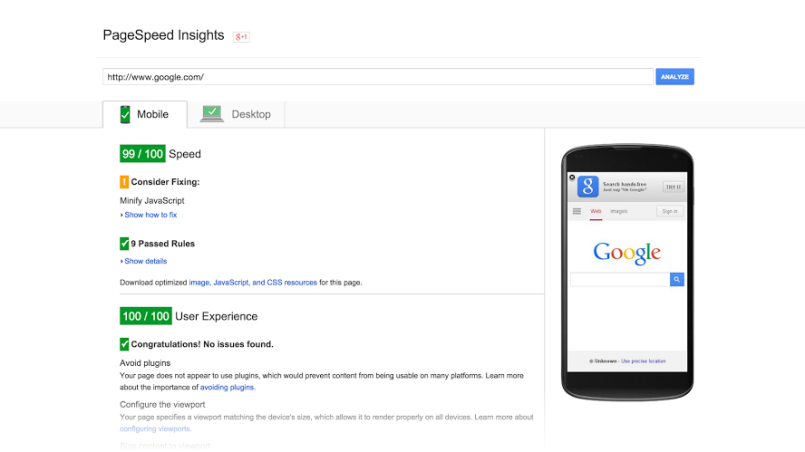
Page speed has been a ranking factor for ages and will continue to grow in importance as sites get bigger, more bloated and the internet larger. The fastest sites will be the benchmark and what users prefer using especially on mobile devices or places with low bandwidth. You can test your site's page speed and even get recommendations for speeding up your site using this tool from Google.
Get it here: https://developers.google.com/speed/pagespeed/insights/
4. Open Graph Test - Facebook
When you or someone shares content from your site to Facebook, Facebook sends a crawler which will scrape the HTML of the URL being shared. If the content is not specified with the use of OG tags the crawler will guess and pull in what it feels will be the best image and text to display. To remove the guess-work for the crawler or do custom posting changes OG tags are what you should be using. You can test what the Facebook crawler sees and how your pages will be displayed on Facebook feeds using this tool.
Get it here: https://developers.facebook.com/tools/debug/
5. Rich Pin Test - Pinterest
Running rich pin markups on your site's pages can really improve your Pinterest posts and Pinterest Share click-through rates. According to Sproutsocial rich pins get 36% more interactions than those without. Testing to see if they fire correctly and how they will display
Get it here: https://developers.pinterest.com/tools/url-debugger/
6. Rich Card Test - Twitter
Running rich card markups on your site's pages can really improve your Twitter posts and Twitter Share click-through rates. Testing to see if they fire correctly and how they will display in Twitter feeds can be done using this handy tool.
Get it here: https://dev.twitter.com/docs/cards/validation/validator
7. Tag and Script Test - Ghostery
Adding tracking and third party tagging has become rather popular and even easier with the use of Google Tag Manager. Checking that your tags are firing correctly and data is being passed to the correct sources is essential and you can do all this using ghostly.
Protip! You can also run browser a/b testing with and without tags being fired through its chrome plugin.
Get it here: https://www.ghostery.com/
8. Site Overview Summary - Nibbler
Gives you a great overview of your site covering on page factors, social media, page speed and more. It's also very handy when doing a competitor site analysis.
Get it here: http://nibbler.silktide.com/
Contact us
If you want to know more about page testing tools don’t be shy we’re happy to assist. Simply contact us here
Tags: facebook, Google+, How to, Pinterest, SEO, Social Media, Tools, Twitter
You might also like

Best Tender Platforms in South Africa
27 August 2026
Posted by Candice Reed in Industry Experts
Compare the best tender platforms in South Africa by pricing, coverage, alerts, and ease of use to find the right fit for your business.
Read more
What Zero Commission Means for DXY Traders on Exness Pro Account
10 September 2026
Posted by Joana Borges in Money Talks
Zero commission on the Exness Pro Account means you pay no extra per-lot fee when you open or close a DXY (US Dollar Index) trade. Here is how it wor...
Read more
{{comment.sUserName}}
{{comment.iDayLastEdit}} day ago
{{comment.iDayLastEdit}} days ago