 News Home
 {{blogcategory.sCategoryName}}
Recent posts

Industry Experts
What Works the Best in a Monthly Digital Marketing Report
20 August 2026

Alarming
The Fake ChatGPT Subscription Invoices or Billing Details Scam
18 August 2026

nichemarket Advice
How To Setup OpenAI ChatGPT Ads Measurement Pixel
16 August 2026

nichemarket Advice
How Do I Know ChatGPT Ads Are Right For My Business?
15 August 2026
Popular posts
Extravaganza
Trending Music Hashtags To Get Your Posts Noticed
24 August 2018
Geek Chic
How To Fix iPhone/iPad Only Charging In Certain Positions
05 July 2020
Extravaganza
Trending Wedding Hashtags To Get Your Posts Noticed
18 September 2018
Money Talks
How To Find Coupons & Vouchers Online In South Africa
28 March 2019
How To Track Social Sharing In Google Analytics
04 September 2018 | 1 comments | Posted by Che Kohler in nichemarket Advice
Social media has become a powerful marketing tool and is essential to just about any sites success online. It has taken the concept of word of mouth and digitized and amplified into one of the most rewarding free traffic drivers available today. Social media metrics have become more and more important to the modern marketer and gathering data on how content performs on social is key to improving your presence on these platforms.
However, In recent months Twitter, LinkedIn
Social tracking options
Fortunately, there are 3rd party social sharing apps that capture this data on their server and store it for you but you are then tied to that platform, and these are more often than not, paid services. If you're not too concerned about having your shares displayed publicly on your site or just want more insight into what content is being shared then setting up your social tracking reports in Google analytics is a must.
How to track social media shares with google analytics
Hardcoded
If you're using Google Analytics Universal on your site you're running custom social interaction buttons you can add on click event tracking to each of your elements. Add the following code to each of your elements and update with the relevant social media channel and action.
ga('send', 'social', [socialNetwork], [socialAction], [socialTarget], [fieldsObject]);
| Field Name | Value Type | Required | Description |
|---|---|---|---|
| text | yes | The network on which the action occurs (e.g. Facebook, Twitter) | |
| socialAction | text | yes | The type of action that happens (e.g. Like, Send, Tweet). |
| socialTarget | text | yes | Specifies the target of a social interaction. This value is typically a URL but can be any text. (e.g. http://mycoolpage.com) |
Note: By default, Google Analytics provides integrated reporting for the +1 Button. This means if you have implemented analytics.js and a +1 Button on the same page, all +1 interactions will be automatically reported as social interactions via each of the trackers on the page.
Plugin
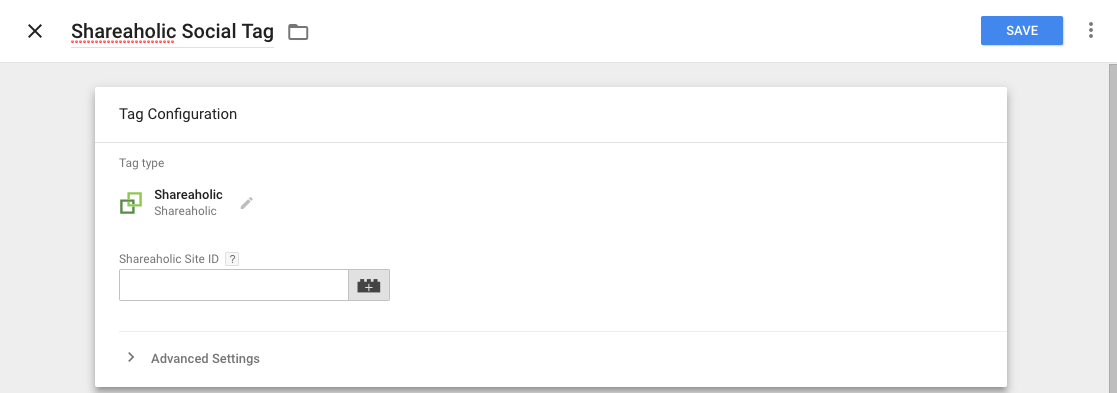
There is a range of social plugins available that can do the job, but my personal favourite is Shareaholic. It's available as a WordPress plugin or as a tag template in Google Tag manager.
- All you will need to do is set up a Shareaholic account
- Follow the installation details and get your Shareaholic ID.
- Add your ID to the tag and finally set the trigger to fire on all pages
Google Tag Manager
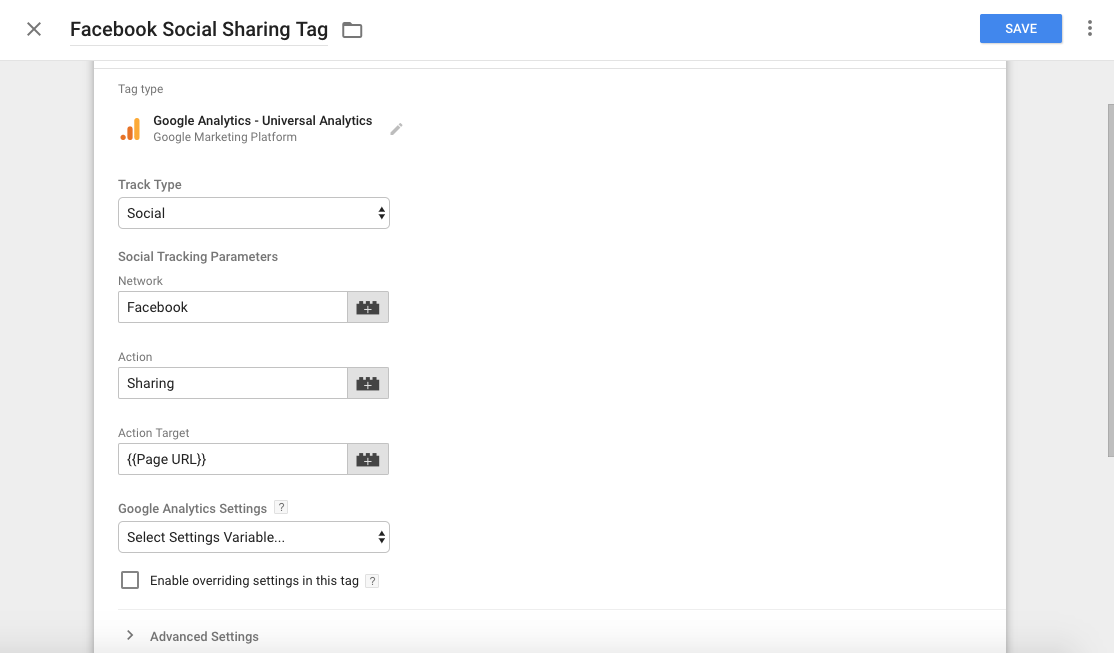
If you're not keen on injecting 3rd party scripts on your site and you're running GTM then you can create your own custom tag. You will need to first set up an click tracker on each element you want to track. Once you've set up a trigger and then create a Google Analytics Universal tag.
- Select the track type social
- Add your parameters for each social network
- Finally, set the tag to fire on all the pages hosting your native social prompts
How to find social media reports in Google Analytics
Once you have your reporting set up and would like to start reviewing your data.
- Login to your analytics account
- Click on the acquisition tab
- Click on social
You should now have access to 6 new reports based on your site users social media activity.
Explore your social circle
While social media reporting is available in Google Analytics, it is not enabled by default so you will have to do some research on how to set it up correctly for your website.
Once it's set up correctly, you will have access to a wealth of data particularly if you're site relies heavily on social media as a source of traffic.
In my personal opinion, this is one of my favourite reports to get up since it gives you great insights into traffic from dark social (Non tracked social media traffic) which is usually attributed to direct traffic.
Note: There are also additional metrics you can look at adding and if you want to know more about custom metrics check out our post - 30+ Metrics You Can Track Using GA Custom Dimensions
Contact us
If you want to know more about analytics or social media marketing for your site, don’t be shy we’re happy to assist. Simply contact us
You might also like
How To Setup OpenAI ChatGPT Ads Measurement Pixel
16 August 2026
Posted by Che Kohler in nichemarket Advice
A detailed breakdown of each method of adding ChatGPT's ads measurement pixel to your site so you can pass on conversion data to your OpenAI Ads acco...
Read moreWhat Works the Best in a Monthly Digital Marketing Report
20 August 2026
Posted by Biance Baker in Industry Experts
Discover the top methods for a monthly digital marketing report: traffic metrics, SEO, PPC, and social media to track what's working.
Read more
{{comment.sUserName}}
{{comment.iDayLastEdit}} day ago
{{comment.iDayLastEdit}} days ago