 News Home
 {{blogcategory.sCategoryName}}
Recent posts
Geek Chic
Make Underwater City Characters Come Alive with Talking Photos
10 October 2026

Hit the Road
How to Rent a Car in Dubai Without Paying a Security Deposit
06 October 2026

Hit the Road
A Travel Guide to Renting and Driving in Morocco's Biggest City
06 October 2026

Press Releases
As Gold Prices Hit Record Highs, LoanAgainst Offers South Africans a Way to Unlock Cash Without Selling Their Gold
29 September 2026
Popular posts
Extravaganza
Trending Music Hashtags To Get Your Posts Noticed
24 August 2018
Geek Chic
How To Fix iPhone/iPad Only Charging In Certain Positions
05 July 2020
Extravaganza
Trending Wedding Hashtags To Get Your Posts Noticed
18 September 2018
Money Talks
How To Find Coupons & Vouchers Online In South Africa
28 March 2019
Make Underwater City Characters Come Alive with Talking Photos
10 October 2026 | 0 comments | Posted by Staff Writer - Pippit in Geek Chic
Picture a drowned city where every window glows teal and a jellyfish lamplighter is clocking in for the night shift. Now picture that lamplighter talking to you.
That's what a talking photo can do for your underwater artwork, and Pippit keeps the whole process painless.
You upload a still, add a voice, and your character starts speaking with natural lip movement and expression. No animation degree, no weekend lost to keyframes.
If you've got a folder of AI-made sea folk gathering digital dust, this guide shows you how to give them something to say.
Ready to hear from the deep? Open Pippit and try it as you read.
Why a sunken city needs a voice
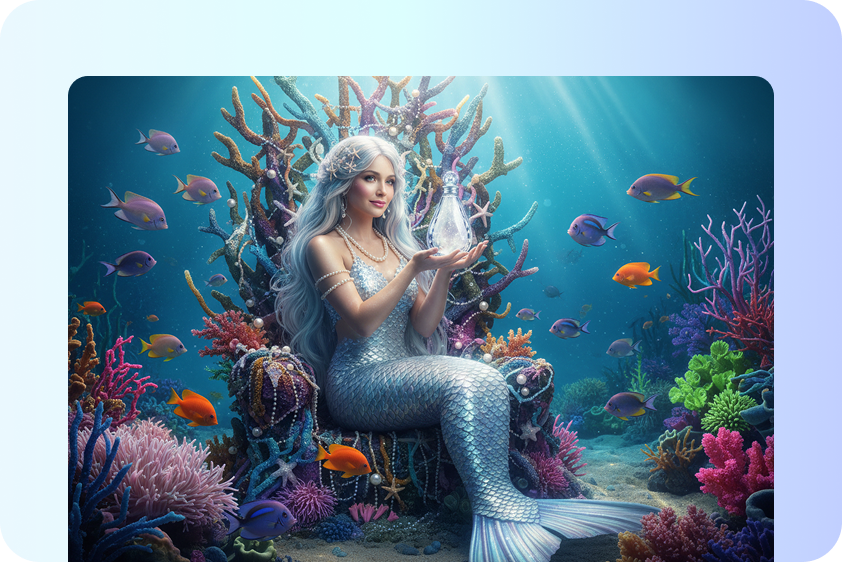
Underwater scenes are gorgeous but quiet.
A coral market, a rusted sub, a ring of glowing fish: you can stare at them all day, yet nothing in the frame tells you who anyone is.
Speech fixes that fast.
The moment a barnacle-covered harbor master clears his throat and announces last call for the tide, he stops being scenery and becomes someone with opinions.
Viewers remember characters who talk, and they share them too. That's the whole appeal here. Your artwork already has the mood, so a voice just adds the personality.
Pick a cast worth listening to
Not every picture suits a speaking role. Faces that sit clearly in the frame work best, so start by sorting your images. A few characters that tend to pay off:
The harbor master: weathered, grumpy, full of rules nobody asked for.
A jellyfish lamplighter who narrates the city's evening routine.
A retired submarine pilot telling exaggerated stories at the café.
A kelp farmer who gives tourists terrible directions on purpose.
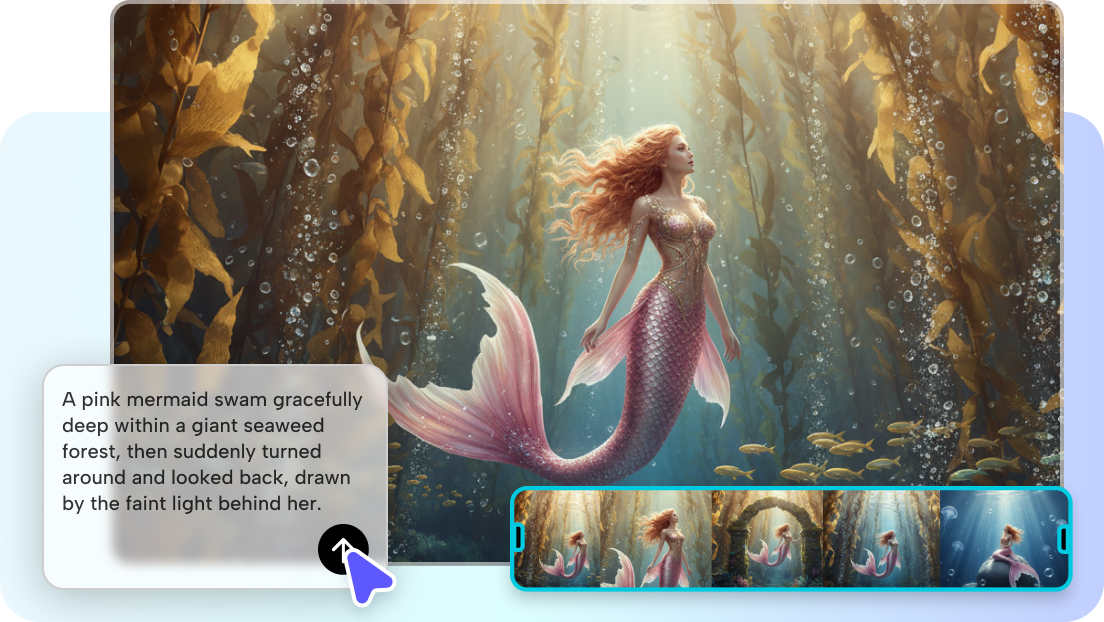
A mermaid news anchor reading the daily current report.
Three moves from silent frame to chatty citizen
Here's the good news: Pippit keeps this short, and once you've done it for one character, the rest take a couple of minutes each.
Step 1: Find the right tool in Pippit
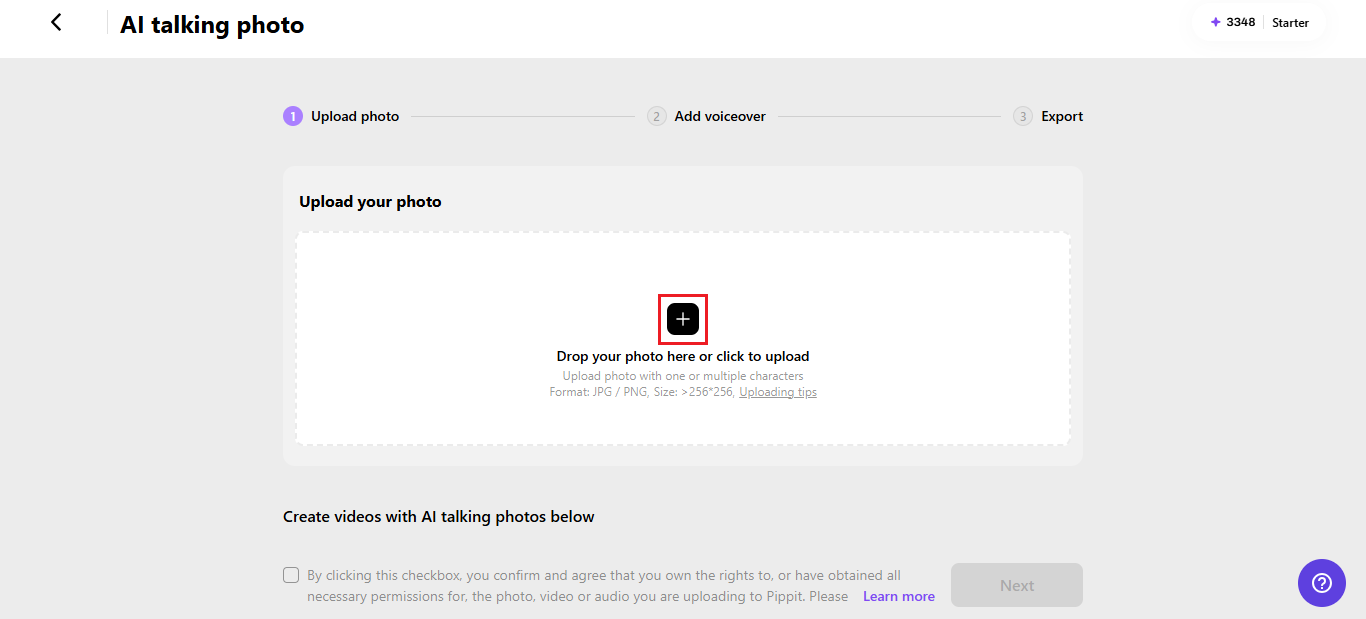
Sign in to your Pippit account and head to the Video generator.
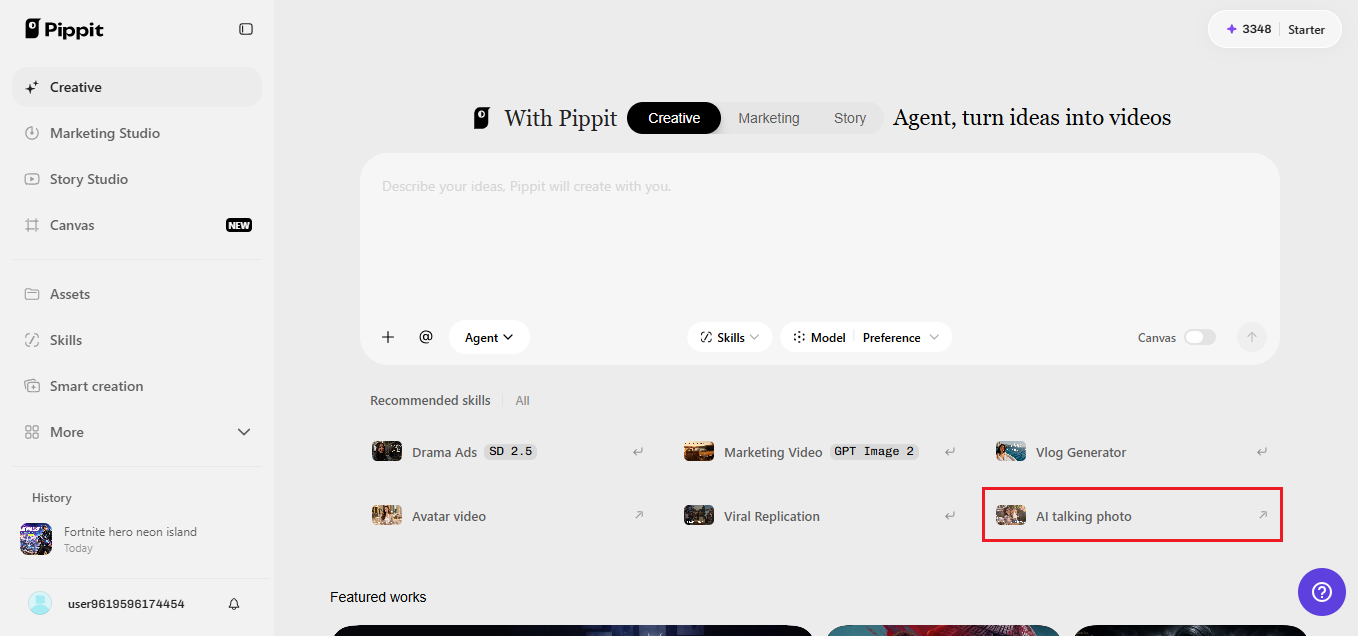
From there, pick the AI feature that makes a still image speak. Drop in your character's picture, either by clicking the upload box or dragging the file across. The image needs to be at least 256x256 pixels. Tick the box confirming you're allowed to use it, then hit Next.
Step 2: Hand your character a script
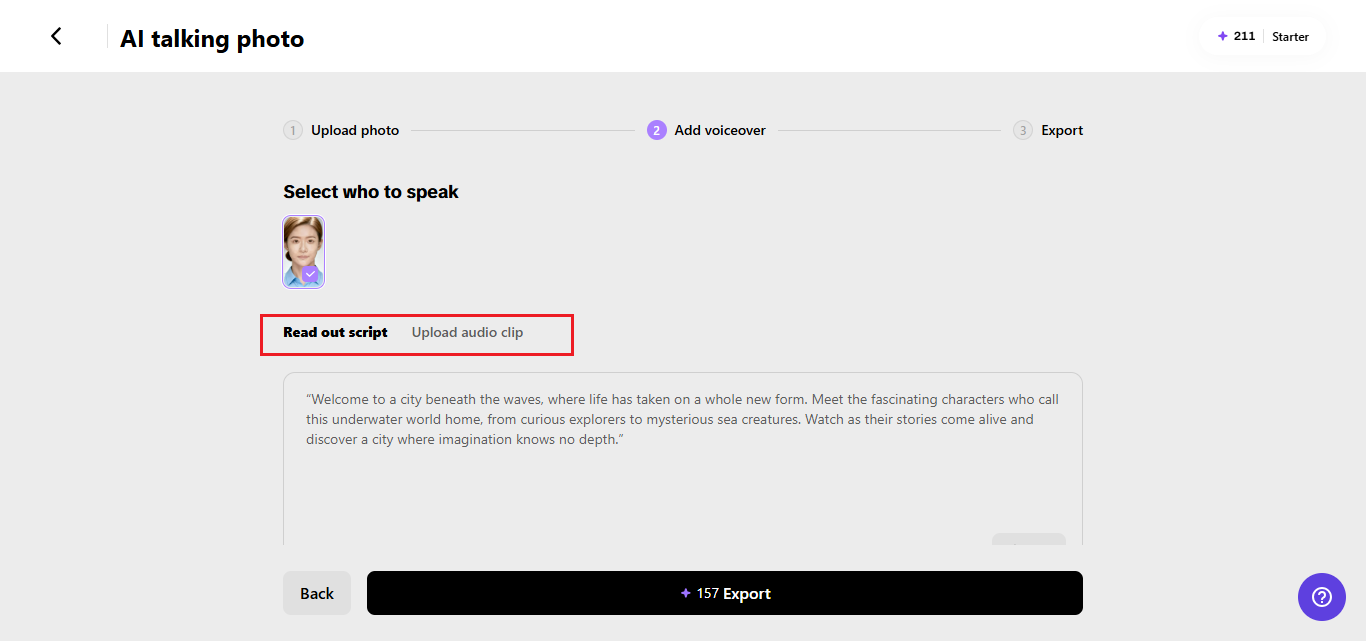
Now choose Read out script and type what your lamplighter should say. Pick a language and a voice, then decide whether you want captions on screen and which style they should take. Save when you're happy.
Prefer your own voice?
Switch to the Upload audio clip tab and add a recording, or grab one of the trending clips instead.
Step 3: Export and download
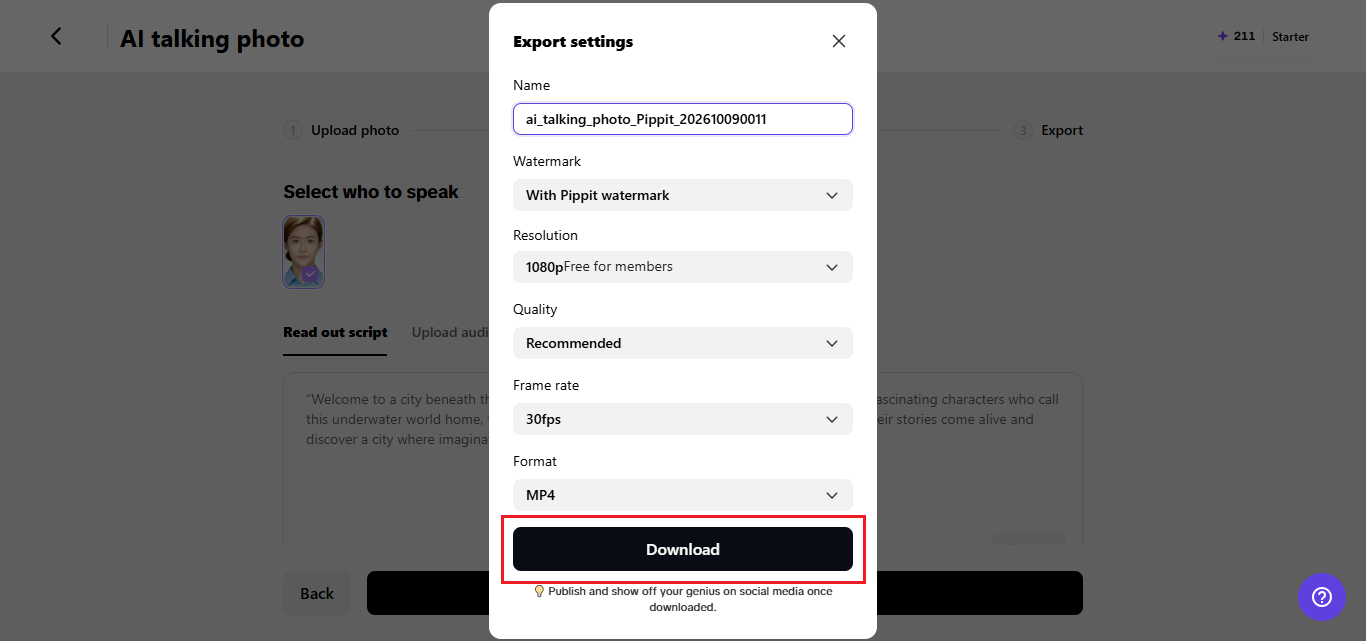
Click Export, then give the video a name. You can keep or remove the watermark and adjust the resolution, quality, frame rate, and format to suit wherever it's headed. Press Download and the finished clip lands on your device, ready to post.
Giving the deep its soundtrack
Dialogue is only half of an underwater scene, and SeedAudio 1.5 inside Pippit takes care of the rest of the soundscape too.
Bubbles, currents, and music in one pass
Describe the scene in plain text and you get dialogue, ambience, effects, and music together as a single coherent result. Ask for muffled echoes and a slow sonar pulse behind your harbor master, and they arrive as one mix instead of four separate jobs.
A voice that stays in character
Give it a reference recording and it keeps that speaker's tone and accent steady from line to line. Each speaker needs their own reference file, and you can use up to six, so a whole market square of residents is possible.
Separate tracks for easy fixes
Dialogue, ambience, effects, and music come out as individual tracks. If the waves drown out the harbor master, turn the ambience down and leave everything else alone. No regenerating, no starting over.
Writing lines that sound waterlogged
Dialogue makes or breaks the effect, so write for the ear. Short sentences land better than long speeches.
Give each character a verbal habit, like the harbor master ending every announcement with "tide waits for no one," and viewers will start to recognize him by sound alone. Read the lines out loud before you paste them in.
If you stumble, the AI voice will too. And leave room for pauses. A slow breath before a punchline does more than another adjective ever could.
Small tweaks that save you a redo
Before you export, run a quick check. Is the face sharp and well lit? Blurry or heavily shadowed faces tend to animate less convincingly, so a crisper version of your image is worth the extra minute.
Keep scripts under about thirty seconds per clip, and string several short clips together instead of forcing one long one.
Match the voice to the character: something deep and slow for the old pilot, something brighter for the lamplighter. Finally, watch the clip once with the sound off to check the captions, then once with the sound on.
Where your sea folk go next
Once your characters can talk, think beyond a single clip. A series works well: one resident per day, each reacting to the same piece of city news.
Short vertical videos suit social feeds, while longer compilations make decent intros for a story channel or a tabletop game session set in your flooded metropolis.
Teachers and parents can use them too, since a talking octopus explaining ocean zones holds attention far better than a slide. Whatever format you pick, keep the cast consistent so people can follow them the way they'd follow a favorite show.
Lighting the way through murky water
Underwater artwork often hides faces in blue haze, and that can trip up the animation. If your character sits deep in shadow, try brightening the portrait before you upload it, or crop in a little closer so the eyes and mouth get more room.
A soft glow from a lantern or a shaft of surface light works wonders because it keeps the mood without hiding the features. Test one version with strong teal tones and another with warmer highlights, then compare how readable each face looks.
The goal is a character who feels submerged but still clearly alive and ready to talk.
Time to let the harbor speak
A silent underwater city is beautiful, but a talkative one is unforgettable. With Pippit, you can take pictures you've already made and turn them into residents with voices, moods, and a bit of attitude.
The whole workflow takes minutes, and the results feel handcrafted. So pick your favorite character, write their first line, and see what they have to say.
Start creating in Pippit today and let your sunken city finally speak up.
Need Help With Your AI strategy?
If this all sounds like too much of a headache and you'd much prefer an expert to set up your strategy, reach out to us, and we'll get you set up.Share your story with nichemarket
Have insights, expertise, or a story your industry needs to hear? Check out our guest post guidelines and contact us to get started.
Are you looking to promote your business?
Business owners can create their free business listings on nichemarket. The more information you provide about your business, the easier it will be for your customers to find you online. Registering with nichemarket is easy; just head to our sign-up form and follow the instructions.
If you need a more detailed guide on creating your profile or listing, we recommend checking out the following articles.
Recommended reading
If you enjoyed this post and have a little extra time to dive deeper down the rabbit hole, why not check out the following posts on AI content.
You might also like

How to Choose a Reliable Water Storage Tank Supplier in South Africa
24 September 2026
Posted by Jasper Stewart in Constructive Criticism
Choosing a reliable water storage tank supplier in South Africa requires evaluating material quality, regulatory compliance, warranty backing, and pr...
Read moreAs Gold Prices Hit Record Highs, LoanAgainst Offers South Africans a Way to Unlock Cash Without Selling Their Gold
29 September 2026
Posted by Lamna Group - Staff Writer in Press Releases
As gold prices hit record highs, LoanAgainst offers secured loans against gold jewellery and coins, so you keep the asset and the upside.
Read more
{{comment.sUserName}}
{{comment.iDayLastEdit}} day ago
{{comment.iDayLastEdit}} days ago