 News Home
 {{blogcategory.sCategoryName}}
Recent posts

Money Talks
Why Do Some Cryptocurrencies Get Listed While Others Don't?
13 November 2026

nichemarket Advice
What Is The GA4 Lead Acquisition Report?
11 November 2026
nichemarket Advice
What Is GA4 Data Manager?
06 November 2026

Press Releases
Too Big to Accept? Why South African Small Businesses Are Turning Down the Orders That Could Grow Them
30 October 2026
Popular posts
Extravaganza
Trending Music Hashtags To Get Your Posts Noticed
24 August 2018
Geek Chic
How To Fix iPhone/iPad Only Charging In Certain Positions
05 July 2020
Extravaganza
Trending Wedding Hashtags To Get Your Posts Noticed
18 September 2018
Money Talks
How To Find Coupons & Vouchers Online In South Africa
28 March 2019
What Is GA4 Data Manager?
06 November 2026 | 0 comments | Posted by Che Kohler in nichemarket Advice
Log in to the GA4 property and go to the Admin panel; as much as I do, you'll quickly notice when something has changed, and recently you'll see a brand-new section at the top of the menu labelled Data Manager BETA. Clicking on it will lead you to a new landing page which looks similar to the old data import option, but there is more to it than that, adding some much-needed automation and unlocking additional reports.
The Data Manager is a unified data ingestion template that simplifies how marketers push, activate, and measure external data flowing into their GA4 properties. Instead of relying on Google Sheets imports or the Measurement Protocol, you now have native connectors to popular ad platforms and data storage tools.
When checking out the Data Manager, I think the connections that stand out most are the ad platforms.
- Meta
- SnapChat
- TikTok
Connecting these platforms lets you supplement your current Google Ads-only campaign data with these channels. That is, of course, if you've run ads in the past or you're currently running ads on these platforms.
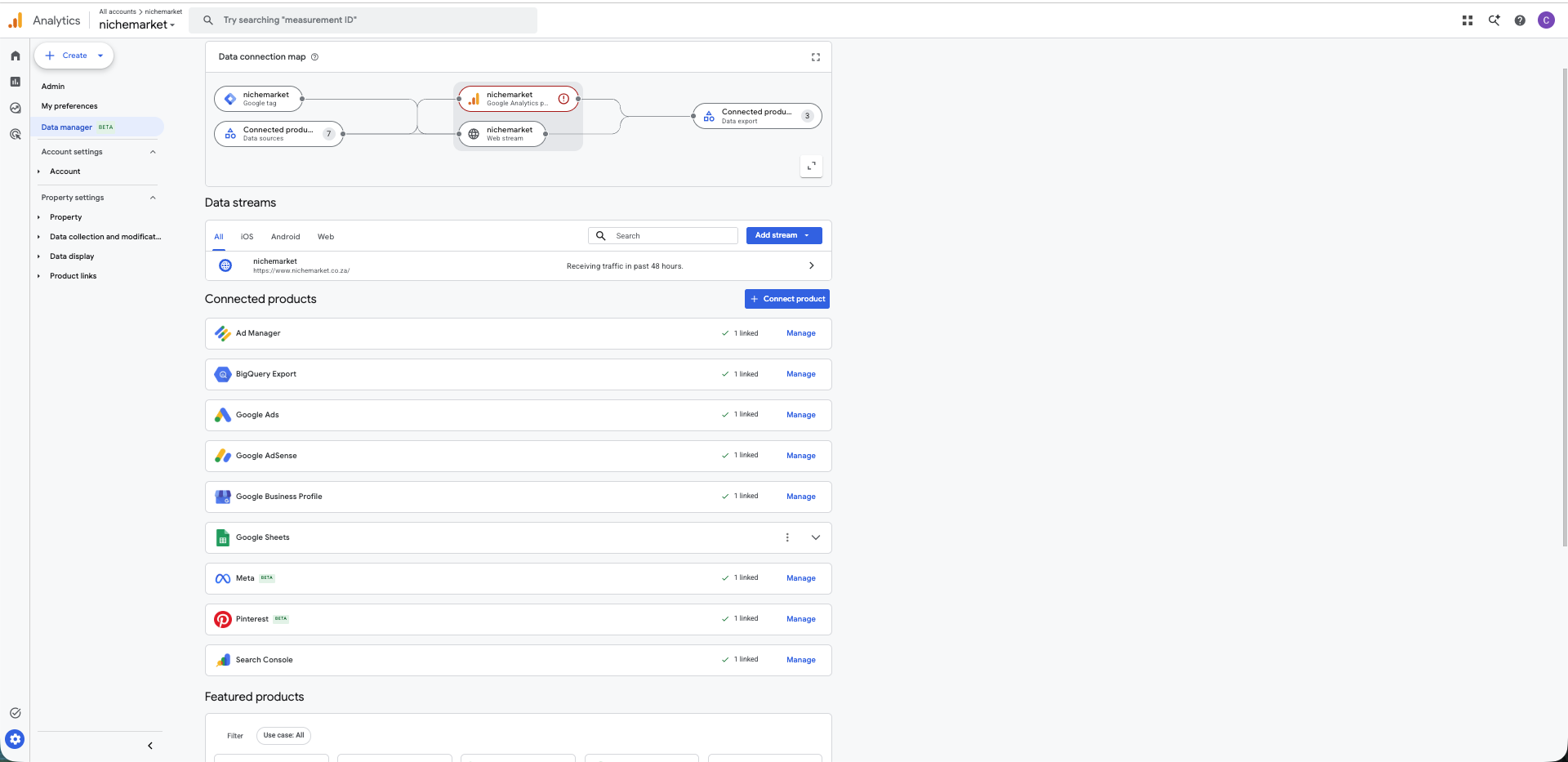
Data Manager Interface In GA4
To make the connection, click the platform, sign in with your account, set the default UTM tracking you're using, and set the intervals for when you want data to sync to your account.
Then leave it to run.
Once it begins to populate, you can navigate to the advertising report section in GA and see all your campaign data from
- Ad impressions
- Ad clicks
- Ad Cost Per click
Matched with on-site data like your sessions, ROAS, key events, etc.
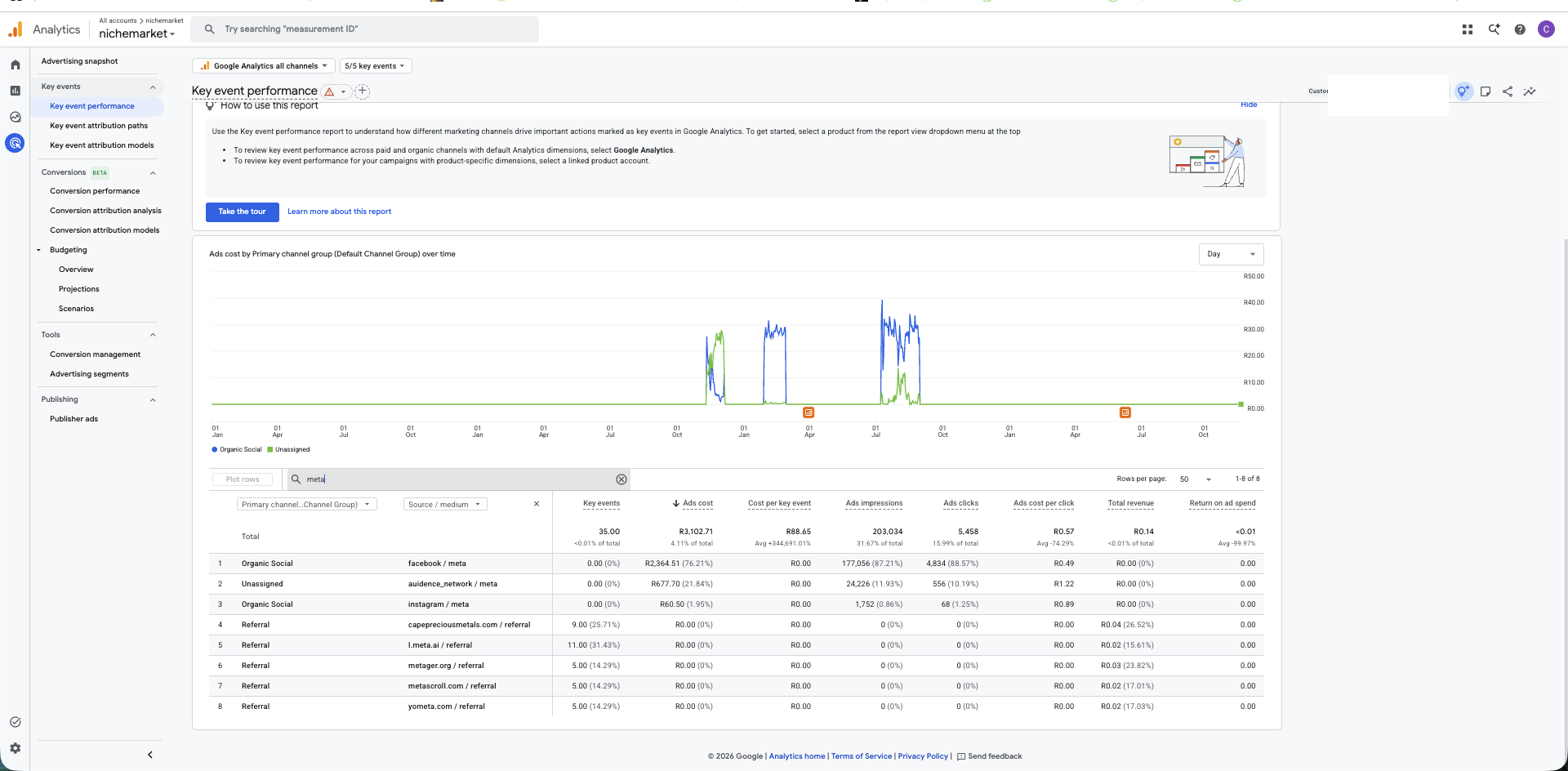
Third party data from Meta imported into the advertising report via Data Manager
GA4 Data Manager BETA vs. Looker Studio Blended Data
Managing data pipelines in Google Analytics 4 (GA4) felt like untangling a box of holiday lights in the dark. If you wanted to see which data streams were active, which Google Ads accounts were linked, where your CRM offline conversions came from, and where your audiences were exported, you had to click through half a dozen buried menus in the Admin panel.
To solve this fragmentation, Google officially rolled out Data Manager (BETA) directly inside the GA4 Admin console. Positioned as a unified, point-and-click hub for your first-party data and product links, it promises to simplify how marketers import offline data, visualise tracking architecture, and feed signals back into Google’s ad ecosystem.
However, as shiny as this new visual hub is, it also introduces a strategic dilemma for data-driven marketers: Should you pipe all your external campaign and CRM data directly into GA4 using Data Manager, or are you still better off keeping GA4 clean and blending your data sources externally in Looker Studio (formerly Google Data Studio)?
What is GA4 Data Manager BETA and How Does It Work?
Located in your GA4 Admin panel directly under Data collection and modification (or near your preferences in the left-hand menu), Data Manager is a centralised control centre designed to govern how data enters and leaves your Analytics property.
Previously, Google Data Manager lived primarily inside Google Ads to help advertisers ingest Customer Match lists and offline conversions. Bringing it into GA4 transforms Analytics into an upstream data router.
The Core Mechanics
The Visual Data Connection Map: The centrepiece of Data Manager is an interactive, four-column spatial map that visualises your entire data lineage from left to right:
Data Sources: The origin of your data (e.g., Google Tag Manager, Salesforce, HubSpot, Meta/TikTok cost data imports, Google Ads links, or SFTP/CSV uploads).
Data Types: Shows the specific import schemas being used (such as cost data, item data, user data, or offline events).
Property and Streams: Your active web and app data streams receiving the data.
Data Export: The downstream destinations receiving your GA4 events and audiences (such as Google Ads, Display & Video 360, or Search Ads 360).
One-Way Downstream Flow: Data imported into GA4 via Data Manager flows downward to linked Google Ads and Google Marketing Platform accounts. Hovering over any node highlights its exact path, and red status indicators immediately alert you to broken tags, expired API tokens, or failing CRM syncs.
No-Code Partner Connectors: Instead of forcing developers to write custom Measurement Protocol scripts or maintain fragile middleware, Data Manager offers point-and-click connectors to map fields from CRMs, e-commerce backends, and third-party ad platforms directly into GA4.
The Pros and Cons of GA4 Data Manager BETA
Like any major platform update—especially one still carrying a BETA tag—Data Manager solves several painful headaches while introducing a few dangerous traps.
The Pros
Instant Architecture Audits: If you inherit a messy GA4 property, the Data Connection Map gives you a 30-second diagnostic of what is connected, what is broken, and where data is flowing.
No-Code First-Party Data Activation: Marketers can connect CRMs or upload offline conversion tables without needing a developer to write server-side API calls, making it much easier to populate reports like GA4's Lead Acquisition report.
Centralised Bidding Signals: By importing cost data (from non-Google platforms) and offline profit/lead quality data into GA4, you can share cleaner, enriched conversion signals directly with Google Ads Smart Bidding.
The Cons
The Double-Counting Trap: Google explicitly warns that data brought into GA4 via Data Manager flows down to Google Ads, not back up. If you already have a direct CRM-to-Google-Ads offline conversion pipeline running and you turn on the same pipeline in GA4 Data Manager, you will double-count conversions and corrupt your automated bidding algorithms.
Strict Schema Rigidity: Data Manager forces your external data into GA4’s rigid event and parameter schemas. If your CRM data or ad platform metrics don't neatly align with Google’s predefined fields, mapping becomes frustrating or impossible.
Beta Limitations & Permanence: Currently, subproperties and roll-up properties aren't supported. More importantly, once you import bad or misconfigured data directly into GA4, you cannot easily "undo" or delete it from your historical property tables.
Data Centralisation: By providing Google with your hashed CRM data, offline Salesforce events, and multi-channel ad spend, you feed its conversion modelling algorithms with broader business intelligence. For some organisations, the convenience of a unified reporting dashboard and improved Google Ads performance is a worthy exchange.
- Clunky Reporting: You can import all the Meta cost data and Salesforce offline conversions you want, but you still have to navigate GA4's limited and clunky Standard Reports.
Why You Might Be Better Off Using Looker Studio with Blended Data
Just because Google lets you pipe external ad spend, CRM deals, and offline metrics directly into GA4 doesn't mean you always should. For many agencies and multi-channel brands, Looker Studio with a blended data source remains the superior analytical approach.
In Looker Studio, data blending acts like a SQL LEFT OUTER JOIN performed entirely at the visualisation layer. You keep your GA4 property focused strictly on what it does best—tracking on-site user behaviour and web conversions—while pulling Meta Ads, LinkedIn Ads, Google Ads, and CRM data into Looker Studio via native or third-party connectors (like Supermetrics, Funnel, or Windsor.ai).
Here is why Looker Studio blending often beats GA4 Data Manager:
Zero Risk of Polluting Your Core Analytics: Blending data in Looker Studio is non-destructive. If a join key breaks or a formula calculates Return on Ad Spend (ROAS) incorrectly, you fix the chart in two minutes without permanently corrupting your underlying GA4 property data.
True Cross-Platform Flexibility: GA4 is inherently biased toward Google’s ecosystem and attribution models. In Looker Studio, you can blend native platform metrics (like Meta’s 7-day click/1-day view conversions alongside GA4’s last-click sessions and CRM revenue) side-by-side in a single table without forcing one platform's attribution rules onto another.
Custom Calculated Metrics: Want to calculate True Blended CAC (Total Ad Spend across 5 platforms divided by Closed-Won CRM Deals) or Net Margin ROAS? Looker Studio allows limitless custom math across disparate tables on the fly.
When to Choose Which Method for Evaluating Campaign Performance
You don't have to treat GA4 Data Manager and Looker Studio blending as mutually exclusive—in mature data stacks, they often coexist. However, when deciding how to evaluate your campaigns, use the following rules of thumb:
Use GA4 Data Manager BETA When:
Your primary goal is Ad Optimisation (Bidding & Audiences): If you need offline CRM milestones (like Qualified Lead or Closed-Won) or third-party audience lists to feed Google’s machine learning algorithms for Smart Bidding and remarketing, Data Manager is the cleanest native pipeline.
You want unified pathing and attribution inside GA4: If you rely heavily on GA4’s Advertising workspace (Data-Driven Attribution, Conversion Paths, and Model Comparison) and want non-Google cost data or offline conversions factored into Google's attribution modelling.
You have a lean tech stack: If you don't pay for third-party ETL/data-piping tools or a data warehouse (like BigQuery) and need a free, native way to pull basic CRM or cost CSVs into Google’s ecosystem.
Use Looker Studio Blended Data When:
Your primary goal is Executive Reporting & Cross-Channel ROI: When stakeholders want a holistic dashboard comparing spend, clicks, pipeline, and actual revenue across Google, Meta, TikTok, LinkedIn, and Email without attribution bias.
Your sales cycle is complex or non-linear: B2B companies with 6-month sales cycles, multiple stakeholders per account, and offline renewals will find GA4’s user-scoped event limits too restrictive. Blending CRM tables directly with ad spend tables in Looker Studio preserves account-level accuracy.
You are auditing or testing new data sources: Never test a brand-new, unverified data import directly inside your live production GA4 property. Prototype and validate your joins in Looker Studio first.
Managing Your Ad Campaign Data
GA4 Data Manager BETA is a massive step forward for visibility, finally giving marketers an X-ray view of their tracking plumbing and a simpler way to activate first-party data. Use it to audit your connections, spot broken tags, and feed high-value offline signals back to Google Ads.
Just remember: ingestion is not the same as reporting. Keep your GA4 property clean and disciplined, and lean on Looker Studio’s data blending whenever you need flexible, risk-free, cross-channel campaign evaluation.
Need Help With Your Tracking?
If this all sounds like too much of a headache and you'd much prefer a tracking expert to set up your ad account pixel, reach out to us and we'll get you set up.
Are you looking to promote your business?
Business owners can create their free business listings on nichemarket. The more information you provide about your business, the easier it will be for your customers to find you online. Registering with nichemarket is easy; just head to our sign-up form and follow the instructions.
If you need a more detailed guide on creating your profile or listing, we recommend checking out the following articles.
Recommended reading
If you enjoyed this post and have a little extra time to dive deeper down the rabbit hole, why not check out the following posts on tracking.
Tags: Data Analytics, Tracking, Digital marketing, Online Marketing
You might also like

5 Best Crypto Payment Gateways in Africa (2026)
30 October 2026
Posted by Angelina Tumakova in Money Talks
Find the best crypto payment gateway for your South African business. Compare fees, supported coins, integrations, settlement, and payout options.
Read moreWhy Do Some Cryptocurrencies Get Listed While Others Don't?
13 November 2026
Posted by Matthew Green in Money Talks
A look at the basic criteria that cryptocurrency exchanges look at before listing a token and how these requirements affect who gets listed and who g...
Read more
{{comment.sUserName}}
{{comment.iDayLastEdit}} day ago
{{comment.iDayLastEdit}} days ago