 News Home
 {{blogcategory.sCategoryName}}
Recent posts
nichemarket Advice
What Is Google's Preferred Source Button?
27 September 2026

Constructive Criticism
How to Choose a Reliable Water Storage Tank Supplier in South Africa
24 September 2026
nichemarket Advice
How LLM Tracking Tools Are Degrading Google and Bing Data
20 September 2026
Hit the Road
Your eSIM says "Installed", but you still have no internet.
19 September 2026
Popular posts
Extravaganza
Trending Music Hashtags To Get Your Posts Noticed
24 August 2018
Geek Chic
How To Fix iPhone/iPad Only Charging In Certain Positions
05 July 2020
Extravaganza
Trending Wedding Hashtags To Get Your Posts Noticed
18 September 2018
Money Talks
How To Find Coupons & Vouchers Online In South Africa
28 March 2019
What Is Google's Preferred Source Button?
27 September 2026 | 0 comments | Posted by Che Kohler in nichemarket Advice
Google initially rolled out the Preferred Sources feature for Top Stories in the US and India on August 12, 2025, and it seemed to be a publisher-focused tool, similar to the " Follow this publication on Google News" button.
Recently, Google upgraded the option for publishers, as the tool seems to be going mainstream with blogs, SaaS sites, and more, and it's also adding it to page templates.
The preferred source button is a piece of code you can drop into your own site that lets a reader mark you as a "preferred source" in Google Search without ever leaving your page. With one click, your content starts getting weighted more heavily for that person across Top Stories, AI Overviews, and AI Mode.
It's the most direct, publisher-controlled visibility lever Google has shipped in years.
But why the need for this expansion?
How Preferred Sources Actually Works
Preferred Sources started life as a setting buried inside Google Search itself. A user searching a news topic could click a star icon next to the Top Stories header, search for outlets they trusted, select them, and reload the results to see more from those sources going forward.
The August 2026 update flips that flow around. Instead of making users hunt for your site in Google's settings, you can now embed a button directly on your pages.
A reader clicks it, confirms the add, and is marked as having selected your site, with Google's own documentation describing the ideal experience as one where the reader "seamlessly" adds the site and is returned to exactly where they left off, without a page reload or a redirect breaking their reading flow.
Once a reader has added you, your content is prioritised in three places for that person specifically:
- Top Stories: your articles surface more often and more prominently when they're fresh and relevant to what that person is searching.
- AI Overviews: Google's AI-generated summary at the top of the results page draws more heavily from sources that the reader has marked as preferred.
- AI Mode: Google's conversational search experience favours your content when synthesising answers for that specific user.
It's worth being precise about what this is and isn't.
Google has been explicit that Preferred Sources is not a global ranking factor. It doesn't move you up the results for everyone searching a given term.
It's per-reader personalisation. The people who click your button see more of you; everyone else's results are unaffected. That's an important distinction for setting expectations with clients or stakeholders.
The value isn't "rank higher"; it's "become the default answer for the people who already trust you."
Three Ways to Enable It?
Google offers three official implementation routes, and it's worth using the right one for the right placement:
1. The standard button (image, icon, or anchor text link). This is the simplest option. A small embeddable widget, sometimes just a star icon or a short piece of anchor text like "Add us as a preferred source," that a reader can click directly on the page. Google auto-detects elements tagged with the button attribute and renders a ready-made badge, translated automatically into the reader's language and themed light or dark to match your site.
2. A custom button bound to Google's JavaScript library. If you want full control over the design matching your own brand colours, using your own icon, placing it inside an existing CTA block, you can build your own button and bind a click event to it, calling Google's addPreferredSource() function manually. This is the option to use for anything that isn't a plain default badge: a styled image, a custom button in your footer, or an element inside a pop-up.
3. A plain deeplink with no JavaScript. For platforms that don't allow custom scripts some CMS environments, email clients, third-party landing pages there's a straightforward link version. It doesn't carry the same seamless "stay on the page" behaviour, but it still adds the site as preferred.
The HTML would look like this:
https://www.google.com/preferences/source?q=Your_Website%27s_URL
And you could link anchor text like this: Add nichemarket as a preferred source
Once the user clicks on it, they'll be sent to a new page/tab to complete the action and will need to return to your site.
The JavaScript implementation is the one that returns the user to your page automatically after the update completes.
That matters more than it sounds: any flow that redirects a reader away from your article to complete an action, even briefly, costs you completions.
The JS option is what makes this genuinely frictionless: click, confirm, and keep reading, with no lost session.
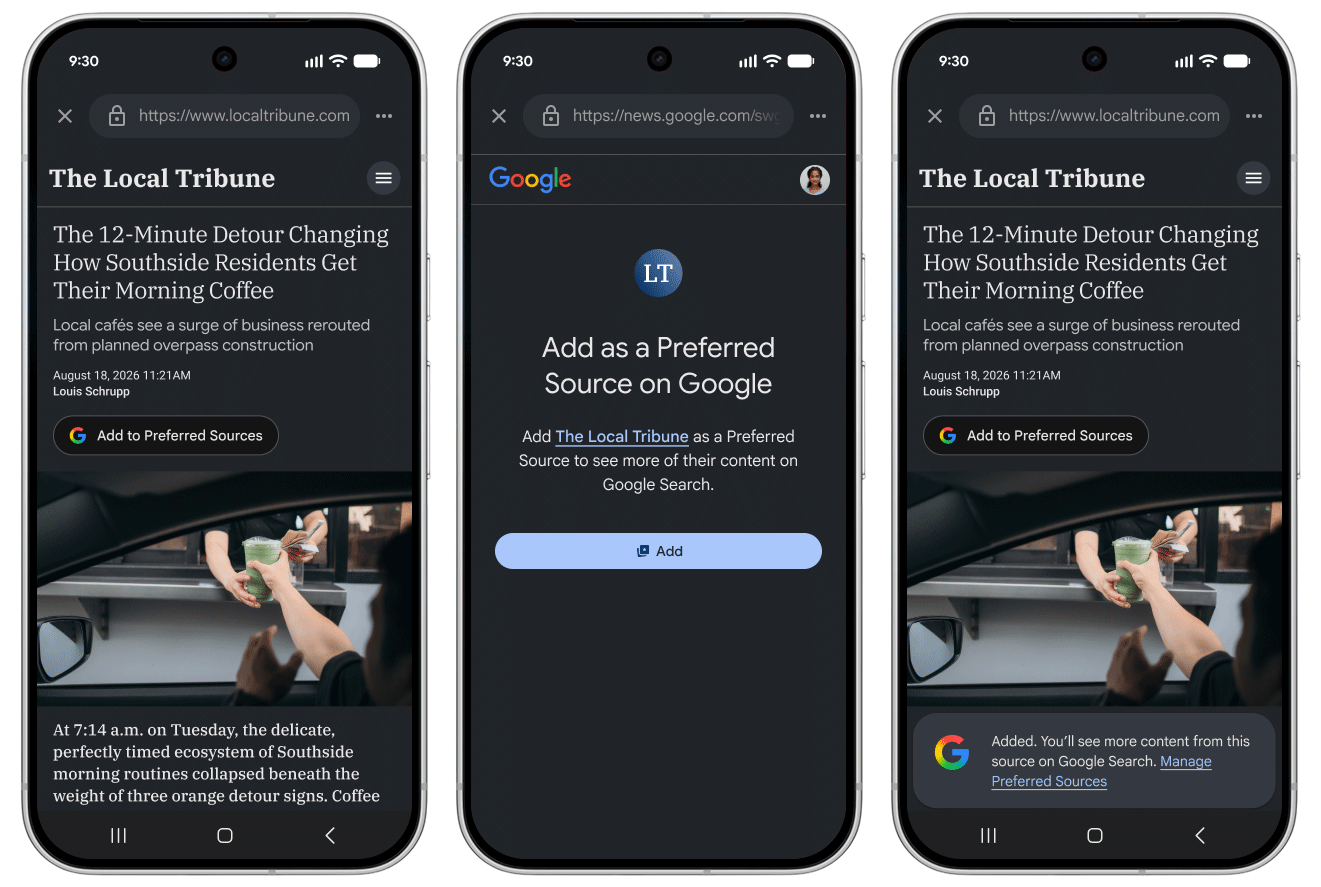
Google's preferred source widget in action
Why This Is Worth Building a Strategy Around?
Referral traffic from search has been getting harder to earn as AI Overviews and AI Mode answer more questions directly on the results page instead of sending clicks to the publisher. Preferred Sources is Google's most direct answer to that shift so far because it gives publishers a lever they control, rather than leaving citation entirely up to the algorithm.
The mechanism itself is what makes it worth investing in: this is an explicit, first-party trust signal. A reader isn't being inferred as a fan of your site based on click behaviour; they're actively telling Google, "show me more of this source."
Google has said people are roughly twice as likely to click through to a link from a source they've marked as preferred, which is a meaningful lift for the readers you convert.
And because the personalisation extends into AI Overviews and AI Mode, not just traditional Top Stories, every reader who adds you becomes measurably more likely to have your content surfaced and cited the next time they ask an AI-generated question in your topic space at a moment when AI-mediated answers are exactly where a lot of visibility is being lost.
Tactics to Get Readers to Actually Click It
A button that exists is worth nothing. The whole game is adoption: getting it in front of readers when they're most receptive to saying yes.
A few placements worth testing:
- On the article page itself, ideally near the byline or at the end of high-performing evergreen content, using the standard JS button so readers never leave the page.
- In your email signature, as a small anchor text link or icon, so every one-to-one email you send becomes a quiet, repeated touchpoint with people who already know and trust you.
- In email newsletter banners, placed near the top where open rates and attention are highest, this reaches your most engaged audience segment in bulk, rather than one email at a time.
- On your Linktree or link-in-bio page, alongside your other social and contact links, social audiences who click through from Instagram or TikTok bios are often first-time visitors worth converting into a standing preference.
- As a pop-up triggered after a reader comments, since commenting is one of the strongest engagement signals available, someone who took the time to comment has already demonstrated trust and is a high-probability yes.
- A pop-up triggered after a reader scrolls to the end of the article, using scroll depth as a proxy for genuine read-through. This avoids interrupting people who bounced early and instead asks only the readers who actually finished the piece, the segment most likely to want more of your content.
- Chatbots: If you have a chatbot on your site, or run one through a third-party messenger like WhatsApp or Facebook Messenger, you can also get these bots to recommend you as a preferred source after answering a user's question.
The pattern across all of these is the same: ask at the moment of demonstrated interest, not on page load. A pop-up that fires the instant someone lands on your site is asking a stranger for a favour.
A pop-up that fires after they've read the whole article or left a comment is asking someone who has already told you, behaviorally, that they value what you publish.

Become Your Readers' Source Of Truth
Preferred Sources won't move your rankings for the general public, and it isn't designed to. What it does is let you convert your most engaged readers the ones who finish articles, comment, open your emails, and click through from your bio link into a standing advantage inside Google's AI Overviews, AI Mode, and Top Stories every time they search.
Treat the button like any other conversion element: place it where trust is highest, use the JavaScript version so it never breaks the reading experience, and measure adoption the same way you'd measure a newsletter signup or a follow button because, functionally, that's exactly what it is.
Need Help With Your AI strategy?
If this all sounds like too much of a headache and you'd much prefer an expert to set up your strategy, reach out to us, and we'll get you set up.Are you looking to promote your business?
Business owners can create their free business listings on nichemarket. The more information you provide about your business, the easier it will be for your customers to find you online. Registering with nichemarket is easy; just head to our sign-up form and follow the instructions.
If you need a more detailed guide on creating your profile or listing, we recommend checking out the following articles.
Recommended reading
If you enjoyed this post and have a little extra time to dive deeper down the rabbit hole, why not check out the following posts on SEO.
- Beware Of The DMCA link Building Scam
- A Comprehensive Guide To Link Building Scams
- How To Build Links From Journalists
- How To Use The Forgotten Art of Dead Link Building To Boost SEO
- How To Build Local Links To Your Website
Tags: SEO
You might also like
How LLM Tracking Tools Are Degrading Google and Bing Data
20 September 2026
Posted by Che Kohler in nichemarket Advice
Third party LLM tracking tools are spamming search console reports with fan out queries that do not provde much value to webmasters and SEOs reviewin...
Read more
What Are Cookieless Pings?
12 September 2026
Posted by Che Kohler in nichemarket Advice
Cookieless pings are anonymous data signals sent to servers which push user activity and consent status, without using tracking cookies when a user d...
Read more
{{comment.sUserName}}
{{comment.iDayLastEdit}} day ago
{{comment.iDayLastEdit}} days ago