 News Home
 {{blogcategory.sCategoryName}}
Recent posts

Money Talks
Why Do Some Cryptocurrencies Get Listed While Others Don't?
13 November 2026

nichemarket Advice
What Is The GA4 Lead Acquisition Report?
11 November 2026

Press Releases
Too Big to Accept? Why South African Small Businesses Are Turning Down the Orders That Could Grow Them
30 October 2026

Money Talks
5 Best Crypto Payment Gateways in Africa (2026)
30 October 2026
Popular posts
Extravaganza
Trending Music Hashtags To Get Your Posts Noticed
24 August 2018
Geek Chic
How To Fix iPhone/iPad Only Charging In Certain Positions
05 July 2020
Extravaganza
Trending Wedding Hashtags To Get Your Posts Noticed
18 September 2018
Money Talks
How To Find Coupons & Vouchers Online In South Africa
28 March 2019
What Is The GA4 Lead Acquisition Report?
11 November 2026 | 0 comments | Posted by Che Kohler in nichemarket Advice
As a seasoned marketer, there are certain metrics we all tend to focus on, and for good reason; for years, they have been the best estimates of how well your efforts are received by the market.
Have we accepted last-click attribution as the standard and often defaulted to the simplest interpretation of the numbers: is traffic going up, and are leads going up? If those two figures are trending upwards, we are at ease. We get to report YoY growth in sessions and conversions and feel pretty happy about it.
But as the landscape matures, search and social media have become more stingy with clicks, and competition means the pool of clicks continues to fragment between players, and yes, year-on-year growth is still possible; relying on it as a metric for success won't be so cut and dry going forward.
Yes, most brands and marketing teams will stick to this figure, but it will likely produce poorer results for the business's bottom line. Chasing volume has become less profitable, and chasing quality is where you should focus your efforts.
But how do we do that? How do we engage with clients and management and tell them that dropping sessions, leads, and conversions isn't always a bad thing?
Well, you need to prove it in the quality of leads you're generating.
Beyond Vanity Metrics: How to Use GA4’s Lead Acquisition Report to Separate Lead Volume from Lead Quality
For years, B2B marketers and lead-generation businesses have suffered from a massive blind spot in web analytics. While e-commerce brands could easily track a user from their first click all the way to a completed checkout with an exact dollar value attached, lead-generation sites were largely left flying blind after the initial form submission.
In traditional analytics setups, a conversion was simply a conversion. Whether a prospect filled out a "Contact Us" form and went on to sign a $50,000 contract, or submitted a fake email address just to download a gated whitepaper, Google Analytics treated both events with equal weight. As a result, marketing teams frequently optimised their ad spend and SEO strategies around lead volume rather than lead quality.
To bridge this gap between top-of-funnel marketing and bottom-of-funnel sales outcomes, Google introduced a dedicated lead-generation reporting suite in Google Analytics 4 (GA4), headlined by the Lead Acquisition report.
What is the GA4 Lead Acquisition Report?
The Lead Acquisition report is a pre-made, user-scoped detail report in GA4 designed specifically for businesses that rely on offline or multi-step sales cycles. Rather than stopping at the initial website inquiry, this report maps the full prospect lifecycle—from their first interaction with your website to the moment your sales team qualifies them and they become a paying customer.
By tying specific, standardised GA4 events to user acquisition dimensions, the report gives you a bird's-eye view of how your marketing channels perform across the entire funnel. Instead of just asking,
"Which channel brought us the most form fills?"
you can finally ask,
"Which channel brought us the leads that actually closed?"
What’s Inside the Report?
Out of the box, the Lead Acquisition report pairs user-scoped traffic dimensions with funnel-specific metrics:
Dimensions: By default, the report uses user-scoped channel groupings (such as First user default channel group, First user primary channel group, or custom channel groups). These include standard channels like Organic Search, Paid Search, Direct, Paid Social, Organic Social, Email, Referral, and Display. Because they are user-scoped, they attribute the entire downstream lead lifecycle back to the channel that originally acquired that user. (Note: Editors can also customise the report to view session-scoped or last-click dimensions).
Metrics:
New leads: The total number of unique users who triggered the
generate_leadevent.Qualified leads: The total number of unique users who triggered the
qualify_leadevent.Converted leads: The total number of unique users who triggered the
close_convert_leadevent.User key event rate: The percentage of total users who completed a designated key event action.
How the Lead Acquisition Report Works
A standard website pixel can easily see when someone clicks "Submit" on a web form, because that action happens in the user's browser. However, a browser pixel cannot see what happens three weeks later when a sales representative gets on a discovery call, marks the prospect as "Sales Qualified" in Salesforce or HubSpot, and eventually closes the deal.
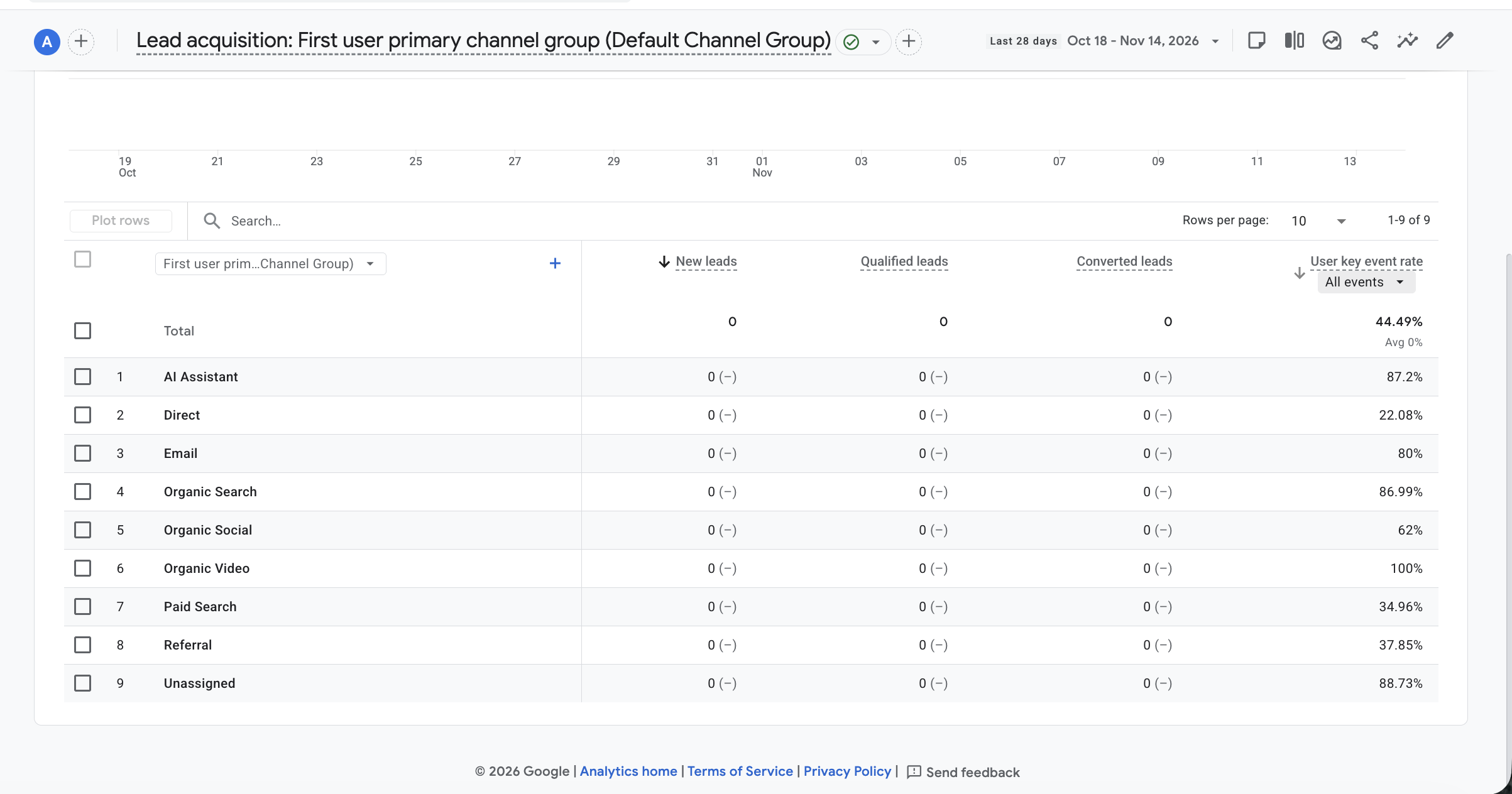
The Lead Acquisition report relies on Google’s recommended lead generation event schema. To populate the columns in this report, your GA4 property needs to receive three specific, sequential events:
generate_lead: Fired on your website (usually via Google Tag Manager) when a user submits an initial inquiry, requests a quote, or books a demo.qualify_lead: Fired when the lead meets your criteria for a viable prospect (e.g., an Marketing Qualified Lead or Sales Qualified Lead).close_convert_lead: Fired when the prospect officially becomes a customer (e.g., a "Closed-Won" opportunity in your CRM).
Because milestones two and three almost always happen offline inside a Customer Relationship Management (CRM) system, this report is designed to be fed via server-to-server tracking—specifically using the GA4 Measurement Protocol or native CRM integrations.
When a deal stage changes in your CRM, your system sends a background ping to Google Analytics containing the user's unique client_id (or user_id) alongside the qualify_lead or close_convert_lead event. GA4 then stitches that offline milestone back to the user's original web session and acquisition source.
How to Enable and Populate the Lead Acquisition Report
If you open your GA4 property today and don’t immediately see the Lead Acquisition report, don't panic. Depending on how your property was originally set up, it may be tucked away in your Report Library or waiting for data to be configured. Here is how to get it up and running.
Step 1: Locate or Add the Report to Your Navigation
Log in to your Google Analytics 4 property and click Reports in the left-hand navigation menu.
Look under the Life cycle > Acquisition section, or—if you selected the Generate leads business objective when creating your property—look under Business objectives > Generate leads.
Click on Lead acquisition.
If the report is missing: Click on Library at the very bottom of the left-hand navigation menu (you must have Editor or Administrator permissions). Locate the Life cycle or Generate leads collection, click Edit collection, search for the Lead acquisition detail report on the right-hand panel, drag it into your navigation tree, and click Save.
Step 2: Implement the Recommended Events
The report will remain blank until you begin feeding it the exact event names Google expects. Custom event names like form_submission_success or deal_won will not automatically populate the pre-built columns.
Front-End Tracking (
generate_lead): Update your Google Tag Manager (GTM) setup so that your primary lead forms fire a GA4 Event tag named exactlygenerate_lead. Be sure to includecurrencyandvalueparameters if you assign an estimated value to raw leads.CRM / Offline Tracking (
qualify_lead&close_convert_lead): Work with your developer or use a middleware tool (like Zapier, Make, or a native CRM connector) to capture the GA4client_idin a hidden form field whenever a user submits a lead on your site. Store that ID on the contact record in your CRM. When your sales team updates the contact's lifecycle stage to Qualified or Converted, trigger a Measurement Protocol hit to GA4 with that sameclient_idand the corresponding event name (qualify_leadorclose_convert_lead).
(Pro-Tip: Google also offers a companion Lead disqualification and loss report, which is populated by sending disqualify_lead and close_unconvert_lead events—allowing you to see which channels are actively wasting your sales team's time).
Note: Some CRM tools already support this report, such as HubSpot, Salesforce, GoHighLevel, Pipedrive, and Zoho CRM, and more will add support in the future. If you're using a custom or unsupported system, you have two options: look to Zapier to see if they have a connection with your CRM, build a custom solution using the GA measurement protocol or do a manual data upload using a Google Sheet.
Lead Quality vs. Lead Volume: Why This Report Changes the Game
Once your data is flowing, the Lead Acquisition report fundamentally transforms how you evaluate marketing performance—especially when analysing your last-click and first-click acquisition drivers.
Consider a classic scenario faced by digital marketers every day:
Imagine you are running campaigns across two primary channels: Paid Social (e.g., Meta/LinkedIn Lead Gen Ads) and Organic Search (SEO). When you look at a traditional analytics report that only tracks raw form fills, Paid Social looks like an absolute superstar:
Paid Social: 500 New Leads ($20 Cost Per Lead)
Organic Search: 100 New Leads ($0 direct ad spend)
If you are only measuring lead volume, the logical business decision is to slash your SEO budget and pour everything into Paid Social.
However, when you open the Lead Acquisition report (and switch your primary dimension to evaluate last-click session sources or user acquisition channels), a completely different reality emerges:
Paid Social: 500 New Leads $\rightarrow$ 25 Qualified Leads (5% qualification rate) $\rightarrow$ 2 Converted Leads
Organic Search: 100 New Leads $\rightarrow$ 60 Qualified Leads (60% qualification rate) $\rightarrow$ 25 Converted Leads
Suddenly, the narrative flips entirely. Paid Social was driving massive top-of-funnel volume, but the intent was low—resulting in hundreds of tire-kickers that bogged down your sales team and produced only two customers. Meanwhile, Organic Search—driven by high-intent users actively searching for solutions—generated 80% fewer raw leads, yet produced 12.5 times more actual revenue.
Unlocking Actionable Attribution Insights
By customising the dimensions in the Lead Acquisition report to compare First-user (top-of-funnel discovery) against Session-scoped / Last-click (the exact touchpoint that pushed the user to convert), you can make surgical optimisations across your marketing stack:
Reallocate Paid Media Budgets: Stop bidding on broad, high-volume keywords or audiences that generate cheap
generate_leadevents, and shift spend toward high-intent campaigns that consistently producequalify_leadandclose_convert_leadevents.Optimise Landing Pages for Intent: If a specific referral source or organic landing page drives high volume but zero qualifications, audit the page copy. You may be attracting the wrong audience or failing to set clear expectations about pricing and service scope before they fill out the form.
Align Sales and Marketing: When both teams look at the same GA4 funnel metrics, finger-pointing stops. Marketing can prove the true ROI of lower-volume channels, and Sales gets higher-quality prospects in their pipeline.
Lead Quality Matters More
In an era of zero-click marketing, rising customer acquisition costs and tightening privacy regulations, measuring marketing success by raw form fills is no longer sustainable. Google Analytics 4’s Lead Acquisition report finally brings e-commerce-level funnel visibility to B2B and service-based businesses.
Assigning a lead quality score to your traffic and a dollar value to each lead will give you much-needed context on where to put your budget and time. You can justify tactical marketing changes, focus on different channels, and narrow down the hottest leads that generate the highest ROI.
By aligning your GTM setup and CRM data with Google's recommended lead events, you can stop chasing vanity volume and start scaling the channels that genuinely grow your bottom line.
Need Help With Your Tracking?
If this all sounds like too much of a headache and you'd much prefer a tracking expert to set up your ad account pixel, reach out to us and we'll get you set up.Are you looking to promote your business?
Business owners can create their free business listings on nichemarket. The more information you provide about your business, the easier it will be for your customers to find you online. Registering with nichemarket is easy; just head to our sign-up form and follow the instructions.
If you need a more detailed guide on creating your profile or listing, we recommend checking out the following articles.
Recommended reading
If you enjoyed this post and have a little extra time to dive deeper down the rabbit hole, why not check out the following posts on tracking.
Tags: Tracking, Online Marketing, Digital Marketing, Analytics
You might also like
5 Best Crypto Payment Gateways in Africa (2026)
30 October 2026
Posted by Angelina Tumakova in Money Talks
Find the best crypto payment gateway for your South African business. Compare fees, supported coins, integrations, settlement, and payout options.
Read more
R16.8 Billion in Overdue Government Invoices: BizFunding Warns SMEs to Plan for a Tough Festive Season Cash Crunch
29 October 2026
Posted by Rui-Miguel Silva in Press Releases
South African SMEs are owed R16.8 billion in overdue government invoices. Find out how invoice funding can help businesses manage cash flow this fest...
Read more
{{comment.sUserName}}
{{comment.iDayLastEdit}} day ago
{{comment.iDayLastEdit}} days ago