 News Home
 {{blogcategory.sCategoryName}}
Recent posts

Geek Chic
How to Improve Your AI Outputs
11 October 2026
Geek Chic
Make Underwater City Characters Come Alive with Talking Photos
10 October 2026

Hit the Road
How to Rent a Car in Dubai Without Paying a Security Deposit
06 October 2026

Hit the Road
A Travel Guide to Renting and Driving in Morocco's Biggest City
06 October 2026
Popular posts
Extravaganza
Trending Music Hashtags To Get Your Posts Noticed
24 August 2018
Geek Chic
How To Fix iPhone/iPad Only Charging In Certain Positions
05 July 2020
Extravaganza
Trending Wedding Hashtags To Get Your Posts Noticed
18 September 2018
Money Talks
How To Find Coupons & Vouchers Online In South Africa
28 March 2019
The Fake ChatGPT Subscription Invoices or Billing Details Scam
18 August 2026 | 0 comments | Posted by Che Kohler in Alarming
If you use ChatGPT Plus, an email claiming there's a problem with your billing is no longer a low-probability event you can safely ignore. It's now one of the most actively used phishing lures in circulation.
Multiple independent security vendors — across Australia, New Zealand, and the US — have documented near-identical campaigns in mid-2026, all built around the same premise: your ChatGPT Plus payment failed, or your billing details need updating, and you need to act now.
This isn't a fringe tactic.
According to Check Point's threat intelligence, ChatGPT entered the top 10 most impersonated brands in phishing attacks for the first time in Q2 2026 — a milestone that says as much about how embedded ChatGPT has become in daily life as it does about the scammers exploiting it.
Why ChatGPT Has Become Such an Attractive Phishing Target
Brand impersonation scams work best when three conditions line up:
- the brand is instantly recognisable,
- a large number of recipients genuinely use the service,
- and the service involves recurring payments people don't think too hard about.
ChatGPT now ticks all three boxes.
The core mechanic is straightforward. By referencing a widely recognised and actively used consumer AI product, a phishing campaign increases the likelihood that a given recipient has a genuine ChatGPT Plus subscription—or, at minimum, recognises the brand as credible. That familiarity reduces the cognitive friction that would normally make someone pause before clicking a billing link.
The workplace angle makes this worse. Organisations that have adopted AI productivity tools across their workforce face an elevated exposure surface, because employees using ChatGPT Plus under personal or corporate accounts are likely to treat these emails as routine billing communications — particularly where the business hasn't set clear internal guidance on how legitimate software subscription notices actually arrive.
Employees who manage AI subscriptions, expense payments, or IT support requests are singled out as a group worth prioritising in awareness training, precisely because they're the roles most likely to encounter a convincing version of this pretext and be authorised to act on it.
There's also a simple numbers game at play.
ChatGPT's user base has scaled so dramatically that a mass phishing blast referencing it will land in the inboxes of millions of genuine subscribers — the same principle that has always made Netflix, PayPal, and Microsoft favourite phishing brands, now extended to a service that's become just as embedded in everyday life in a fraction of the time.
How the Scam Works
The campaigns follow a consistent structure, whether the specific "hook" is a payment failure, a required billing update, or an overdue invoice.
Step 1: The email arrives, styled as routine billing correspondence.
Subject lines are framed around pending billing or a failed payment — language designed to trigger a sense of routine financial urgency that bypasses initial scepticism, rather than looking overtly alarming or malicious.
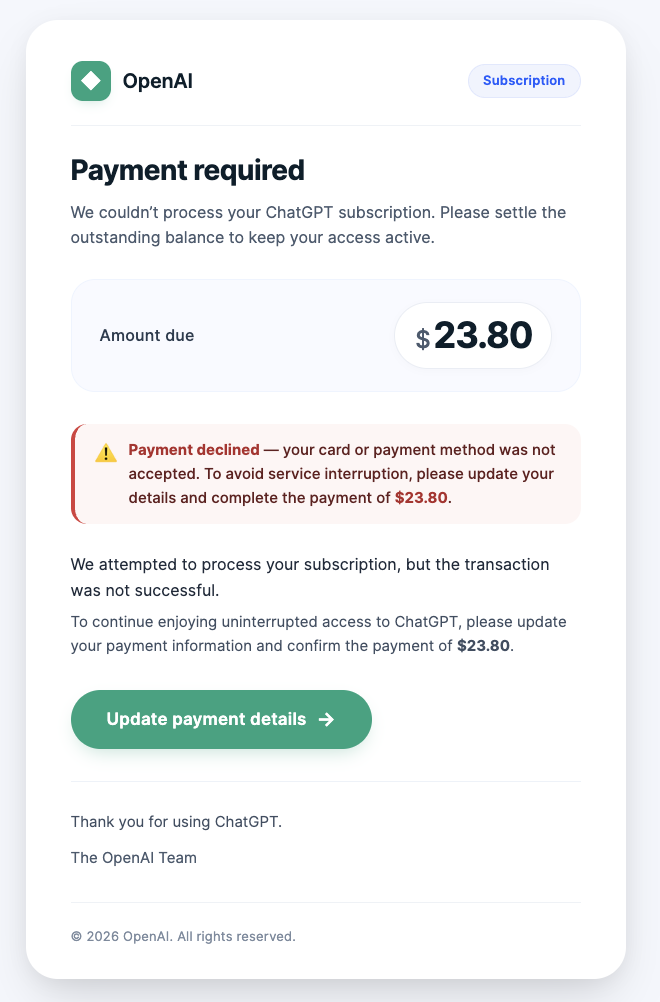
One documented version tells the recipient that their last ChatGPT Plus payment failed on a specific date and that there's a problem with the payment method, instructing them to check with their bank or card issuer before clicking a link to update their payment details and resubscribe.
Step 2: Every link leads to the same destination.
In the campaign intercepted by MailGuard, the email presented two separate links — one to "update your payment details," another framed as a "support article" — and both routed to the exact same phishing destination. This is a common trick: giving the recipient what feels like a safer, more informational option, when both paths lead to the same trap.
Step 3: The link leads to a convincing fake payment page.
Clicking through takes the victim to a phishing site built to imitate a Stripe checkout page — the payment processor OpenAI legitimately uses — designed specifically to encourage the entry of full payment details rather than a login password alone.
Step 4: A fake "processing" step builds false confidence.
In one documented version, after card details are entered, a VISA-branded pop-up appears with a loading indicator, creating the impression of a secure transaction being processed — reinforcing trust and encouraging the victim to wait while their details are captured in the background.
Step 5: A fake decline prompts victims to try again — with more cards.
After a short delay, the pop-up times out and the victim is returned to the payment page with an error message, simulating a failed transaction. This is a deliberate design choice: it encourages victims to retry with a different card or re-enter their details, increasing the odds of capturing valid, usable payment data rather than just one attempt.
Some variants skip the payment-failure framing entirely and go straight for urgency, displaying a "PAYMENT ISSUE" page with a red warning box specifically to reinforce urgency and encourage immediate action.
What attackers are ultimately trying to harvest is a complete financial identity kit: email addresses, full card numbers, expiry dates and CVC codes, cardholder names, and billing addresses — enough combined data to conduct fraudulent transactions, commit card-not-present fraud, and support broader identity-based attacks well beyond the initial scam.
Who Is Being Targeted
These campaigns aren't narrowly aimed. Documented targeting spans several overlapping groups:
- Individual ChatGPT Plus subscribers, targeted simply because the odds of hitting a genuine subscriber are now high enough to make mass phishing runs worthwhile.
- All employees at organisations that use AI tools, with finance and accounts payable staff, IT and helpdesk teams, and anyone who personally manages subscriptions or expense payments called out as high-risk roles.
- Executives, flagged specifically as high click-risk for brand impersonation campaigns generally.
- Businesses across technology, social media, banking, and retail sectors, reflecting how broadly this impersonation tactic is being deployed alongside similar scams targeting other well-known brands.
Geographically, this is a global pattern rather than a localised one — near-identical campaigns have been independently intercepted and reported by security vendors in Australia and New Zealand within weeks of each other, alongside US-based threat intelligence reporting the same trend.
Red Flags to Watch For
In the email itself:
- Urgency built around a payment failure, billing problem, or required update — designed to make you act before you stop to think
- A sender domain that doesn't match OpenAI or ChatGPT's legitimate domains, sometimes a compromised but unrelated organisation's domain (one documented case used a hijacked educational institution's domain)
- A display name like "Chat GPT" that's subtly inconsistent with official branding
- Multiple links in the same email that all lead to the identical (non-official) destination
- The email isn't addressed to you personally, or is otherwise generic
- Poor grammar, or missing details you'd expect in a genuine invoice
- No visible body text, with content rendered entirely through images or HTML — a technique sometimes used specifically to evade plain-text email security scanning
On the linked page:
- A checkout or "update payment details" page hosted on a domain unrelated to OpenAI or Stripe's actual infrastructure
- A request for your full card number, expiry date, and CVC through a page reached via an email link rather than your own account dashboard
- A "processing" animation or pop-up that times out and asks you to retry — a tactic used to harvest multiple card attempts
- Small visual inconsistencies: a distorted logo, a button that doesn't quite work, or a domain that looks almost, but not exactly, right
A technical tell worth knowing:
Some of these campaigns pass SPF, DKIM, DMARC, and COMPAUTH authentication checks — meaning "the email technically passed security checks" is not proof of legitimacy on its own, since attackers can pass authentication for the domain they're actually sending from while still impersonating a completely different brand in the email's content and display name.
What to Do
- Don't click links in billing or payment-failure emails. Navigate directly to chatgpt.com or openai.com yourself, or use your bookmarked account dashboard, and check your subscription and billing status there.
- Never re-enter full card details through a link from an email. OpenAI will only communicate genuine billing issues via official @openai.com addresses.
- Check where "reply" would actually go, not just the visible sender name — phishing emails frequently route replies to a completely different domain than the one displayed.
- Report it. Forward the email to your IT team if it arrived at work, and report phishing attempts to your national cybersecurity reporting service (for example, CERT NZ, the ACSC in Australia, or the FTC/IC3 in the US).
- If you've already entered card details, contact your bank or card issuer immediately to flag the card for fraud and request a replacement, then change your OpenAI account password and enable two-factor authentication if you haven't already.
Watch Out or Get Phished
The fake ChatGPT billing scam isn't especially technically sophisticated — it relies on a spoofed sender, a convincing fake payment page, and old-fashioned urgency rather than any exploit or vulnerability. That's exactly why awareness and verification habits are the most effective defence: treat any unexpected billing or payment-failure email as suspicious by default, and always resolve subscription issues by going directly to the service yourself, never by clicking through from the email that raised the alarm in the first place.
This article draws on reporting from Mirage Security, Decision1 IT Solutions (The Local Vocal, NZ), and MailGuard.
Are you looking to promote your business?
Business owners can create their free business listing on nichemarket. The more information you provide about your business, the easier it will be for your customers to find you online. Registering with nichemarket is easy; all you will need to do is head over to our sign-up form and follow the instructions.
If you require a more detailed guide on how to create your profile or your listing, then we highly recommend you check out the following articles.
Recommended reading
If you enjoyed this post and have a little extra time to dive deeper down the rabbit hole, why not check out the following posts on web security?
- Will Hetzner's Security Breach cost them the SA Business Awards?
- How Does Site Maintenance Improve Website Health?
- WordPress Blogs Defaced By Hackers
- Why You Should Upgrade Your Site To TLS 1.3
- How To Protect Yourself When Using Public WiFi
- 9 Simple WordPress Security Tricks to Keep Your Website Safe
Tags: Scam, AI Assistants
You might also like
How to Improve Your AI Outputs
11 October 2026
Posted by Che Kohler in Geek Chic
If you want to save on the tokens you are spending and improve the quality of your LLM outputs, you should take advantage of MCPs, Connectors, Plugin...
Read more
What Is Google's Preferred Source Button?
27 September 2026
Posted by Che Kohler in nichemarket Advice
Preferred Source is a widget that publishers can embed on their websites allowing readers to add a site to their personal preferred sources on Google...
Read more
{{comment.sUserName}}
{{comment.iDayLastEdit}} day ago
{{comment.iDayLastEdit}} days ago