 News Home
 {{blogcategory.sCategoryName}}
Recent posts

Money Talks
What South Africa's Latest Financial Pressure Data Tells Us About Household Debt
16 September 2026

nichemarket Advice
What Are Cookieless Pings?
12 September 2026
Money Talks
What Zero Commission Means for DXY Traders on Exness Pro Account
10 September 2026

Constructive Criticism
How to Read a Tar Surfacing Quote (So You Don't Overpay)
31 August 2026
Popular posts
Extravaganza
Trending Music Hashtags To Get Your Posts Noticed
24 August 2018
Geek Chic
How To Fix iPhone/iPad Only Charging In Certain Positions
05 July 2020
Extravaganza
Trending Wedding Hashtags To Get Your Posts Noticed
18 September 2018
Money Talks
How To Find Coupons & Vouchers Online In South Africa
28 March 2019
Resolve vcruntime140.dll error on WAMP in 2 minutes
13 April 2017 | 0 comments | Posted by Shamima Ahmed in nichemarket Advice

So you ready to build your site on your local and have heard that WAMP is the best localhost server in town. You download the software, install and now you can't run it due to a runtime error VCRUNTIME140.Dll MISSING
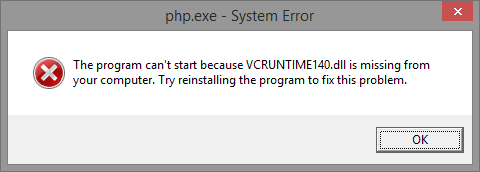
That's no issue, here's how to resolve this issue on Windows in 2 minutes!
- Uninstall WAMP
- Download install Visual C++ Redistributable
- Reinstall WAMP
Either you do it now or you do it later, but you'll need to run a fresh install either way. So let's just get it over and done with and move on with our lives!
You will need to download and install Visual C++ Redistributable for Visual Studio 2015. Download directly from the Microsoft site here.
Just click the download button, choose the correct versions and you almost there. Install once the download has completed.
One last time and I promise you will be back in business
Once you run WAMP again the icon will be green and you're good to go!
Contact us
If you have any questions regarding WAMP installations, comment below or feel free to contact us here!
Are you looking to promote your business?
South African Business owners can create your free business listing on nichemarket. The more information you provide about your business, the easier it will be for your customers to find you online. Registering with nichemarket is easy; all you will need to do is head over to our sign up form and follow the instructions.
If you require a more detailed guide on how to create your profile or your listing, then we highly recommend you check out the following articles.
Recommended reading
If you enjoyed this post and have time to spare why not check out more WordPress Tips:
- Quickly Resolve WP-VCD Malware Attack on Wordpress
- How To Use The Classic Editor After Upgrading To WordPress 5
- Track Contact Form 7 Conversions via Google Analytics in 2 Minutes
- How To Actually Integrate Contact Form 7 And Google reCAPTCHA V2
- Using Child Theme vs Parent Theme for WordPress Builds
- 11 WordPress Plugins to help you Integrate with Google Products
- Wordpress Blogs Defaced By Hackers
- Wordpress Migration: How to successfully move your website to a new host
You might also like
How to Read a Tar Surfacing Quote (So You Don't Overpay)
31 August 2026
Posted by Frank N in Constructive Criticism
Learn why the cheapest tar surfacing quote often costs more long-term, and the three questions that expose what's really excluded.
Read moreWhat Zero Commission Means for DXY Traders on Exness Pro Account
10 September 2026
Posted by Joana Borges in Money Talks
Zero commission on the Exness Pro Account means you pay no extra per-lot fee when you open or close a DXY (US Dollar Index) trade. Here is how it wor...
Read more
{{comment.sUserName}}
{{comment.iDayLastEdit}} day ago
{{comment.iDayLastEdit}} days ago