 News Home
 {{blogcategory.sCategoryName}}
Recent posts

Money Talks
How DXY CFD Trading Works Without Owning Six Currencies
28 September 2026
Alarming
The "Fatal Accident Complaint" Email Scam
28 September 2026
nichemarket Advice
What Is Google's Preferred Source Button?
27 September 2026

Constructive Criticism
How to Choose a Reliable Water Storage Tank Supplier in South Africa
24 September 2026
Popular posts
Extravaganza
Trending Music Hashtags To Get Your Posts Noticed
24 August 2018
Geek Chic
How To Fix iPhone/iPad Only Charging In Certain Positions
05 July 2020
Extravaganza
Trending Wedding Hashtags To Get Your Posts Noticed
18 September 2018
Money Talks
How To Find Coupons & Vouchers Online In South Africa
28 March 2019
The "Fatal Accident Complaint" Email Scam
28 September 2026 | 0 comments | Posted by Che Kohler in Alarming
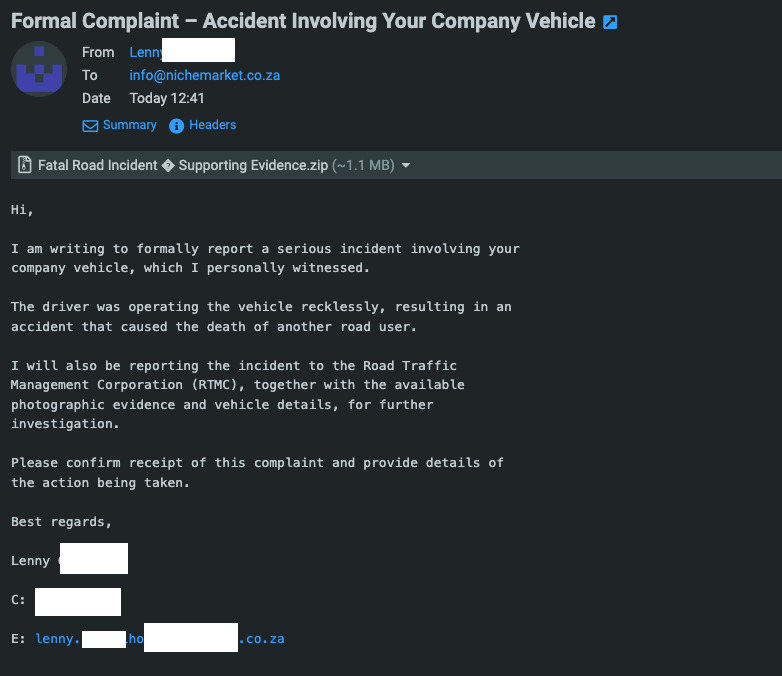
Imagine opening your business inbox and finding this subject line: "Formal Complaint – Accident Involving Your Company Vehicle." The message says a witness saw your driver cause a fatal crash. The witness is reporting it to the authorities and wants an immediate response. A ZIP file called "Supporting Evidence" is attached.
Your stomach drops, and that reaction is exactly what the scammer is counting on. It wants you to act emotionally and resolve the issue with as little damage as possible to your business operations or reputation.
This is a real, currently circulating scam that targets South African businesses. Below is how it works, how to spot it, and what to do if someone in your company has already clicked.
Because this isn't a sophisticated scam, the template is blasted out to thousands of businesses, some of which aren't applicable, like those that don't have company cars, remote businesses, etc.
But for those that do, especially logistics businesses, this scam can be a lot more effective.
What the Email Looks Like
The message is short, formal, and vaguely threatening. A typical version has these features:
- A serious, emotive subject line that mentions a company vehicle, an accident, and a formal complaint
- A claim of a death, which is far more alarming than a fender-bender
- A named authority, such as the Road Traffic Management Corporation (RTMC), to make the threat feel official
- A demand for action, asking you to confirm receipt and explain what you're doing about it
- A ZIP attachment with a name like "Supporting Evidence" or "Photographic Evidence"
- A generic greeting and no specifics: no date, location, registration number, or driver name
The email is sent to a generic address such as info@ or admin@, because attackers aren't targeting you personally. They send the same message to thousands of businesses and wait for someone who owns or drives a company vehicle to panic.
Why the Scam Works
This scam exploits psychology more than technology. It uses three levers.
Fear. An accusation of a fatal accident triggers an immediate emotional reaction. Fear narrows our thinking and pushes us to act before we've verified anything.
Urgency and authority. Naming a government body and promising to report you suggests a clock is ticking. Scammers want you to open the attachment before you have time to think.
Plausibility. Most businesses have vehicles, and most vehicles have drivers the owner can't watch every minute. Even a sceptical owner might briefly wonder whether it's true, and that moment of doubt is all the attacker needs.
Scammers can perform this type of attack as part of another hack. For example, they might hack into reputable businesses or create domains with names very similar to a reputable business and email you, which can help you bypass your initial scepticism and increase your chances of responding.
What's Actually in the ZIP File
The attachment isn't evidence of anything. In campaigns like this one, ZIP files typically contain one of the following:
- A disguised executable or script. The file may look like a PDF or image but is actually a program. Windows hides file extensions by default, so "Evidence.pdf.exe" can appear as "Evidence.pdf".
- Malware that steals data. So-called infostealers harvest saved browser passwords, session cookies, and banking details.
- Remote access tools. These give attackers control of the machine, from which they can spy, move to other devices on your network, or prepare a ransomware attack.
- A shortcut or script that downloads more malware once opened, so the ZIP itself looks harmless to a basic scan.
Attackers use ZIP files because they can slip past some email filters. Password-protected ZIPs are even harder for filters to inspect. For an attacker, a small file (this one is about 1.1 MB) is enough.
A variation of the same scam skips the attachment. Instead, it links to an "evidence portal" or file-sharing page that asks you to log in with your email or Microsoft credentials. The page is a phishing site built to capture whatever you type. The pretext is identical and only the delivery method changes.
Red Flags to Look For
Even a convincing email usually has tells:
- Vague details. A real witness would give a date, location, and registration number. Scam emails never do.
- Mismatched sender details. The signature email domain often doesn't match the sender's supposed identity or has no connection to road safety or your business.
- A generic recipient. Emails to info@ or a general address, with no company or vehicle named, suggest mass mailing.
- Pressure to act immediately and to "confirm receipt".
- Odd characters in the attachment name, such as random symbols where punctuation should be. These often come from sloppy text encoding in bulk-sent scam kits.
- No mention of police. A genuine fatal accident would involve SAPS and traffic authorities contacting you directly, not an anonymous witness emailing a ZIP file.
What to Do If You Receive This Email
- Don't open the attachment or click any link. That includes "just to see what it is".
- Don't reply. A response confirms your address is active and invites further contact.
- Check internally. If you're worried, ask your fleet manager or drivers whether anything has happened. A phone call to a driver takes a minute.
- Contact authorities through official channels if you genuinely suspect an incident. Never use contact details from the suspicious email.
- Warn your team. Tell staff, especially anyone who handles general inboxes, that this email is circulating.
- Report and delete. Flag it as phishing in your email provider, and report it to your IT provider or the SAPS cybercrime unit if you'd like it on record.
What to Do If Someone Already Clicked
Act fast:
- Disconnect the device from Wi-Fi and the network immediately.
- Don't log in to anything from that machine.
- Change passwords for email, banking, and business systems from a different, clean device. Enable multi-factor authentication if you haven't already.
- Run a full security scan, and ideally have an IT professional inspect or rebuild the machine.
- Notify your bank if financial or payment credentials may have been exposed.
- Check for forwarding rules or unusual logins in your email account, which attackers often create to maintain access.
How to Protect Your Business Long-Term
- Turn on file extension visibility in Windows so disguised executables are easier to spot.
- Use email filtering that blocks or quarantines executable content inside archives.
- Enforce multi-factor authentication on all business accounts.
- Run regular staff awareness training. Employees are your best defence when they know what these emails look like.
- Keep systems and antivirus patched and up to date.
- Establish a simple rule: Don't open attachments from unknown senders until you've verified them.
Stay on Guard
Scammers don't need sophisticated hacking skills when a well-placed shock can do the work for them. If an email makes you panic, treat that as a reason to slow down. Verify through a trusted channel, and never let an unexpected attachment convince you to act before you've thought it through.
Are you looking to promote your business?
Business owners can create their free business listing on nichemarket. The more information you provide about your business, the easier it will be for your customers to find you online. Registering with nichemarket is easy; just head to our sign-up form and follow the instructions.
If you need a more detailed guide on creating your profile or listing, we recommend checking out the following articles.
Recommended reading
If you enjoyed this post and have a little extra time to dive deeper down the rabbit hole, check out the following posts on web security.
You might also like
How to Choose a Reliable Water Storage Tank Supplier in South Africa
24 September 2026
Posted by Jasper Stewart in Constructive Criticism
Choosing a reliable water storage tank supplier in South Africa requires evaluating material quality, regulatory compliance, warranty backing, and pr...
Read moreHow DXY CFD Trading Works Without Owning Six Currencies
28 September 2026
Posted by Joana Borges in Money Talks
Learn how DXY CFD trading works, what moves the US Dollar Index, and how one position replaces six currency trades, plus costs and risks.
Read more
{{comment.sUserName}}
{{comment.iDayLastEdit}} day ago
{{comment.iDayLastEdit}} days ago