 News Home
 {{blogcategory.sCategoryName}}
Recent posts
Image-to-Video-AI-Magic.png)
Geek Chic
Skip the Photoshoot: Sell Smarter with Image-to-Video AI Magic
16 October 2026
nichemarket Advice
What Are Enhanced Conversions?
15 October 2026

Hit the Road
Planning a Scenic Escape: How to Choose Hotels in Lijiang
14 October 2026
Geek Chic
How to Improve Your AI Outputs
11 October 2026
Popular posts
Extravaganza
Trending Music Hashtags To Get Your Posts Noticed
24 August 2018
Geek Chic
How To Fix iPhone/iPad Only Charging In Certain Positions
05 July 2020
Extravaganza
Trending Wedding Hashtags To Get Your Posts Noticed
18 September 2018
Money Talks
How To Find Coupons & Vouchers Online In South Africa
28 March 2019
Skip the Photoshoot: Sell Smarter with Image-to-Video AI Magic
16 October 2026 | 0 comments | Posted by Staff Writer - Pippit in Geek Chic
Product photography helps online shoppers understand how a product looks, how it's designed, and how it's positioned before they buy. But with traditional photoshoots, you need to schedule the shoot, arrange lighting, props, and multiple production sessions. Dreamina AI converts suitable product images into animated videos, using text prompts and creative direction from a reference. Using controlled camera moves, slow reveals, and atmospheric backgrounds can make existing visuals more interesting. But careful review is still necessary, as promotional animation should never misrepresent actual product features or performance.
Why Static Product Photos Sometimes Need a Motion-Based Companion
Static images convey product shape, colour, and appearance but can't show movement on their own. Video adds varied points of view to highlight specific design details and surface finishes. Careful camera movement can highlight packaging, and subtle movement can create a more cinematic presentation. Dreamina AI can transform suitable product images into engaging marketing materials without an additional photoshoot. But promotional animation is different from factual demonstrations of functionality. The generated motion should not create new capabilities, but rather maintain product characteristics.
Choose the Right Product Image Before Generating Video
The source image quality can shape the creative direction and serve as a strong visual reference for animation. Before uploading, choose an approved picture with clear dimensions, colours, and as little clutter as possible. When products contain reflective surfaces or rich textures, good lighting helps to interpret surfaces. Select a viewpoint where the feature is clearly visible, and add extra references if needed. Dreamina AI includes Seedance models for reference-guided content creation and https://dreamina.capcut.com/tools/ai-video-generator-from-image offers access to its image-to-video generation process. References are well chosen to enhance direction but cannot ensure complete preservation.
Steps to Skip the Photoshoot: Sell Smarter with Image-to-Video AI Magic
Step1: Upload your product photo and write a promo prompt
- Sign up or log in to Dreamina to start making product videos from one photo.
- Open the left menu, then go to the "Create" tab and select the "AI video" option.
- Enter a detailed text prompt that explains how your product video should look and feel. Add video elements, theme, and concept details, such as lighting, setting, and overall brand mood.
Blog-Dreamina-step1.PNG)
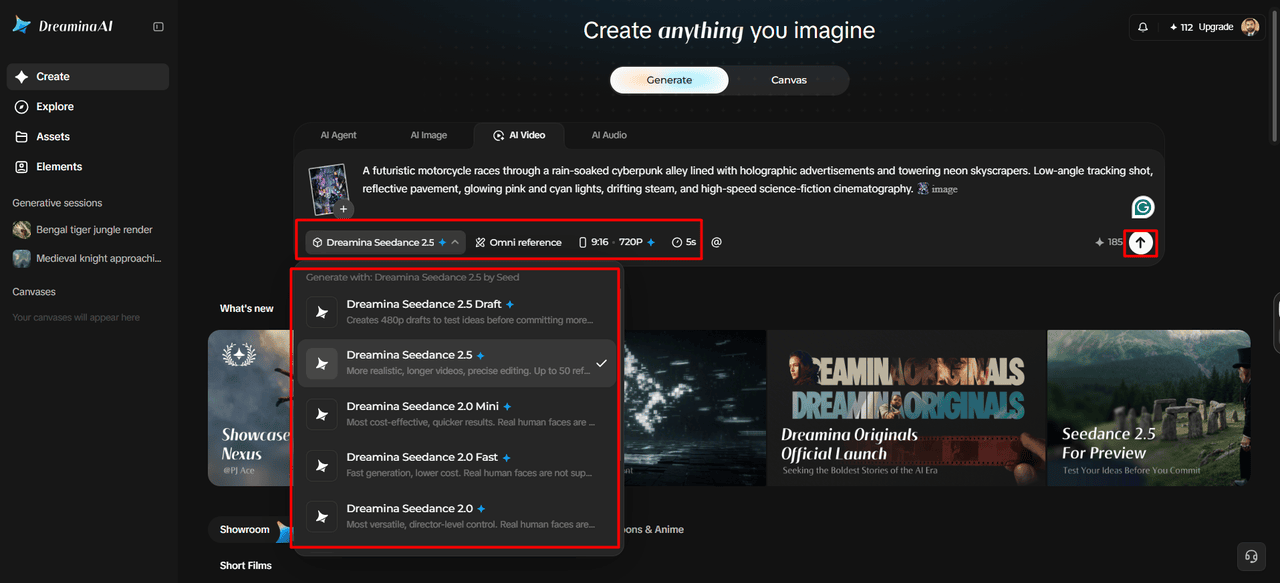
Step 2: Select your model and ad format
- Now choose a model from the options present at the bottom of the dialogue box.
- Your choices here include Dreamina Seedance 2.5, Dreamina Seedance 2.0, and Dreamina Seedance 2.0 Fast. Dreamina Seedance 2.0 Mini, Dreamina Seedance 1.0, etc., suit smaller budgets and faster ad tests.
- Click on "Omni reference" to guide the AI with multiple reference images of your product. This keeps your product details accurate and consistent across every generated video clip you create.
- Match your ad platform using the "Aspect ratio" and "Resolution" tabs for a custom setup.
- Finally, click on the "Generate" tab to begin creating your very first product ad video clip.
Step 3: Refine your ad and export
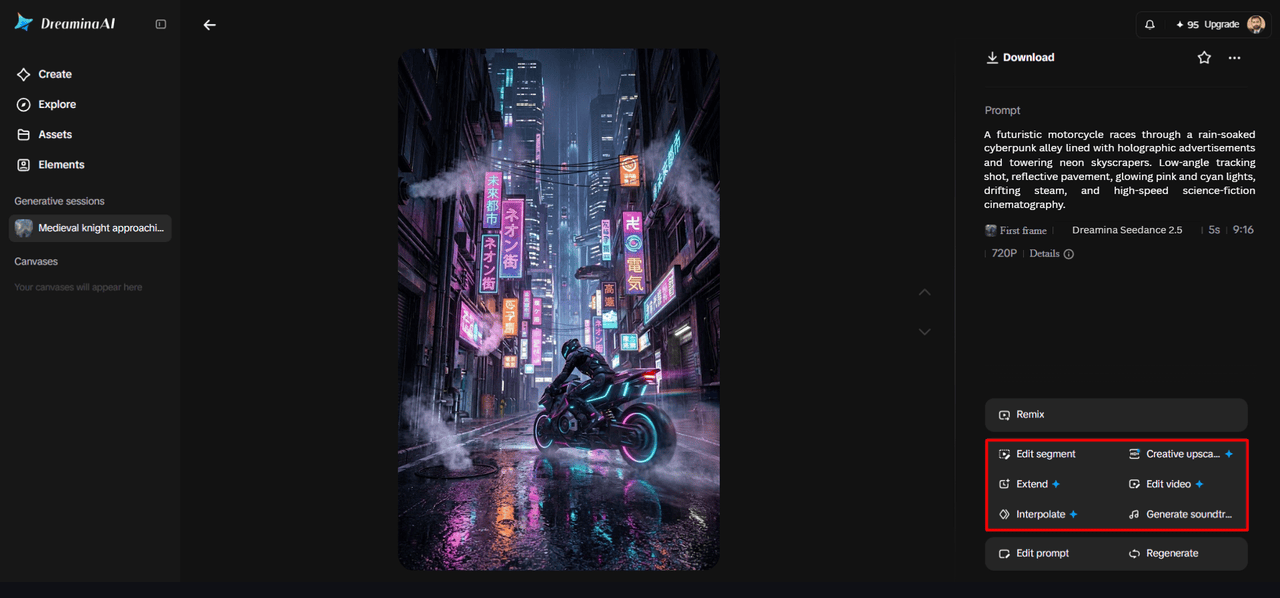
- If the ad misses, click "Edit prompt" or "Regenerate" to refine the results.
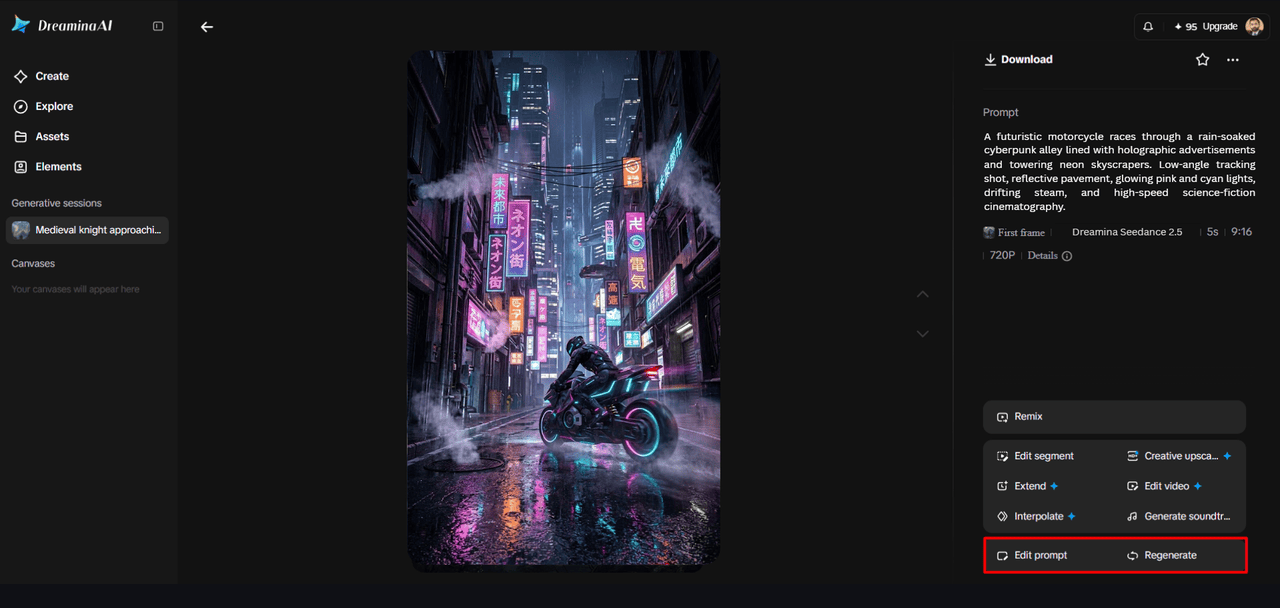
- Fine-tune the generated video with the "Edit video" option to better match your brand style.
- Select "Edit segment" to fix one product scene without touching the rest of your video.
- Choose "Extend video" to lengthen the ad, or "Creative upscale" to improve your video quality.
- Dreamina gives you complete freedom to edit your ad videos exactly the way you like.
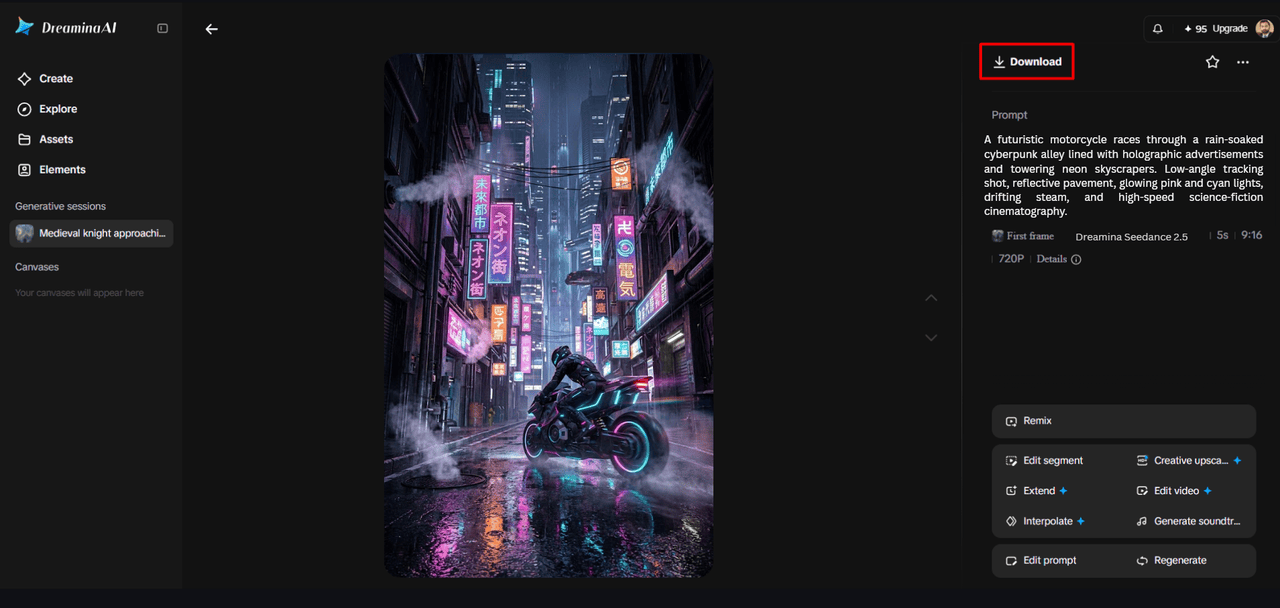
- Finally, click on the "Download" tab present at the top right of the interface screen. Save the video file on your local device and publish it across your sales channels.
Six Product Video Concepts You Can Create From Existing Images
Dreamina AI offers various creative directions to promote products, depending on the image and the message you want to convey.
- Hero product reveal: Do a product reveal with a slow push through the camera, maintaining the product's shape.
- Texture presentation: Emphasise materials and finishes that are visible, then check whether the surfaces match the real product.
- Lifestyle atmosphere: Set up an attractive environment without suggesting unverified use or testing of the product.
- Packaging spotlight: Carefully examine packaging logos, labels, and fine print, and accent packaging colors and shapes.
- Seasonal promotion: Use appropriate ambient light and motion, without sacrificing the product's visibility.
- Feature-led sequence: Concentrate on a design feature that is noticeable; avoid using simulated movement to demonstrate functionality.
Match the Animation Approach to the Product Category
Different product types require different visual priorities and accuracy checks. Camera movement is a great asset to fashion accessories, where it can show off silhouettes, colours, and materials. Controlled reflections and lighting often work well for beauty products, highlighting packaging. When designing a room, subtle shifts in vantage point can convey a sense of form and location, enhancing the overall aesthetic of the decor. Consumer electronics may require special precautions for screens, interfaces, or simulated operations. The packaging of food should be properly labelled and not misrepresent the food or ingredients. The limited movement enhances unique design elements and textures of handcrafted products.
Build a Product Content Workflow Around Reusable Visual Assets
An organised asset library can reduce repetitive prep and maintain visual consistency across campaigns. Approved images by product category, model, colour, and campaign, with clear filenames for generated clips. Create a product brief that outlines camera movement, ambience, and product information. Brainstorm appropriate advertising spots, and review product identity across variations. Preserve original photographs and approved exports for future revisions. Review all clips for visual accuracy, legibility, and appropriateness for the intended platform prior to publication.
Protect Product Accuracy and Marketing Credibility
AI-generated motion can inadvertently change geometry, colours, packaging, or subtle identifying details. Check out logos, proportions, labels, and other critical elements before utilising generated footage for commercial purposes. Do not give invented functions, unsupported performance claims, or simulated outcomes as verified evidence. Distinguish between atmospheric (promotional) and demonstration (how things work) content. Check permissions for source images, brand materials, music, and reference materials. Research and adhere to advertising disclosure and platform policies before posting. These precautions ensure credibility and still permit creative experimentation.
Conclusion
Dreamina AI can take strong product images and turn them into moving marketing materials, without necessarily hiring a photographer. Strong source images, purposeful movement, appropriate settings, and careful refinement produce more coherent results. This strategy works best when you already have photographs that convey key product information. Product animation can strengthen campaigns without misleading potential customers by blending creative presentation with factual content.
Share your story with nichemarket
Have insights, expertise, or a story your industry needs to hear? Check out our guest post guidelines and contact us to get started.
List your business on nichemarket
Get your tech business featured on nichemarket and reach more customers by creating a free business listing today. A well-filled-out profile goes a long way in helping the right customers find you.
New to nichemarket? Start with these helpful guides:
Keep reading:
Want more? We've got plenty more content on Image and Video Creation to keep you inspired.
- Make Underwater City Characters Come Alive with Talking Photos
- How To Use Composition For Product Listings
- Why Video Production Companies Still Outshine AI
- How to Use Videos to Accelerate Your Sales Pipeline
- How To Bend An Image Using Photoshop
Tags: Guest Post, image to video ai, ai product videos, product photography, ai video generator, ai tools, ai
You might also like
What Are Enhanced Conversions?
15 October 2026
Posted by Che Kohler in nichemarket Advice
Enhanced conversions is a feature that improves conversion tracking and bidding performance by supplementing existing conversion tags with first-part...
Read more
As Gold Prices Hit Record Highs, LoanAgainst Offers South Africans a Way to Unlock Cash Without Selling Their Gold
29 September 2026
Posted by Lamna Group - Staff Writer in Press Releases
As gold prices hit record highs, LoanAgainst offers secured loans against gold jewellery and coins, so you keep the asset and the upside.
Read more
{{comment.sUserName}}
{{comment.iDayLastEdit}} day ago
{{comment.iDayLastEdit}} days ago